Picture a Monday at 9 AM. Your team opens the practice dashboard. Client A’s bank feed is pulling transactions as expected. Client B’s feed disconnected over the weekend, and nobody noticed until the bookkeeper tried to reconcile Friday’s entries. Client C just signed on, and you need 14 months of historical transactions before you can file anything.
Three clients, three different problems, one question: where should the transaction data come from? Firms have two ways to get bank data into the books. A bank feed collects transactions through a live connection to the account. Bank statement conversion extracts structured transaction data from a statement document instead.
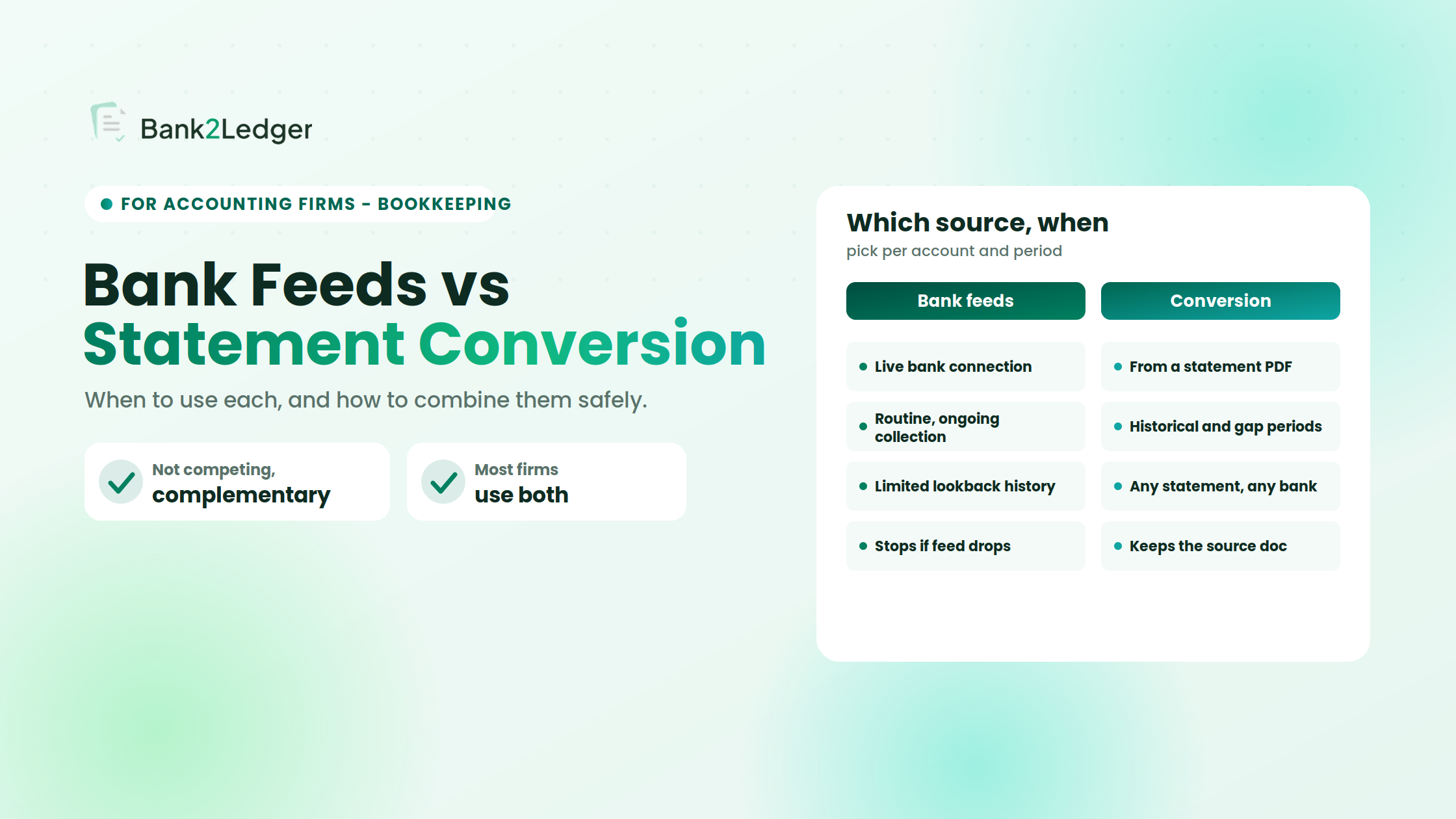
Neither method is universally superior. Bank feeds work well for routine, ongoing collection when the connection is stable. Bank statement conversion fills the gaps feeds cannot reach: historical periods, unsupported banks, and interrupted connections. Most firms benefit from using both strategically rather than treating either as a universal solution.
This article walks through when to lean on each method, how to combine them without creating duplicate entries, and what controls keep the final records trustworthy.
What is the difference between bank feeds and bank statement conversion?
How bank feeds work
A bank feed is a connection between a bank account and an accounting platform. When active, it pulls transaction data (dates, descriptions, amounts) into the software on a recurring basis. The bookkeeper then reviews, categorizes, and reconciles those transactions.
Feed availability varies. Not every bank supports feeds for every account type. Refresh frequency can range from near-real-time to once daily, depending on the institution, connection provider, and accounting platform. Historical reach also differs: some feeds supply 90 days of past transactions on setup, others less, and some none at all. These are not flaws, they are design boundaries worth understanding before you build a workflow around them.
How bank statement conversion works
Bank statement conversion starts with a source document, typically a PDF statement from the bank. The bank statement processing workflow involves several distinct steps:
Bank feeds collect transaction data through a connection. Statement conversion extracts structured data from a statement document. Conversion produces structured data; it does not categorize every line correctly or complete reconciliation on its own.
Bank feeds vs bank statement conversion: a side-by-side comparison
| Criteria | Bank Feeds | Bank Statement Conversion |
|---|---|---|
| Transaction collection | Automated when the connection is active | Requires obtaining and uploading a statement |
| Ongoing bookkeeping | Often practical for regular, connected accounts | More commonly used for specific periods or catch-up work |
| Historical coverage | Limited by the feed provider’s lookback window | Depends on statement availability, not a connection window |
| Bank / account support | Varies by institution, country, and platform | Works with any statement that can be accurately extracted |
| Connection interruptions | Transactions may stop flowing until reconnected | Not affected by feed connectivity |
| Source documentation | No statement PDF produced automatically | Statement PDF serves as the source record |
| Review requirements | Imported transactions still need review | Extracted data needs validation before and after import |
| Duplicate-import risk | Lower for ongoing use; higher when reimporting after a gap | Higher if date ranges overlap with imported feed data |
| Best-suited use | Routine bookkeeping on supported, stable accounts | Historical periods, onboarding, unsupported banks, gap-filling |
The right choice depends on three things: the collection method available for that account, the transaction periods actually covered, and the firm’s controls for validating records and preventing duplicate imports. A feed that works perfectly for one client may not exist for another. A statement that covers 12 months of history is useless if the extraction quality is poor and nobody validates the output.
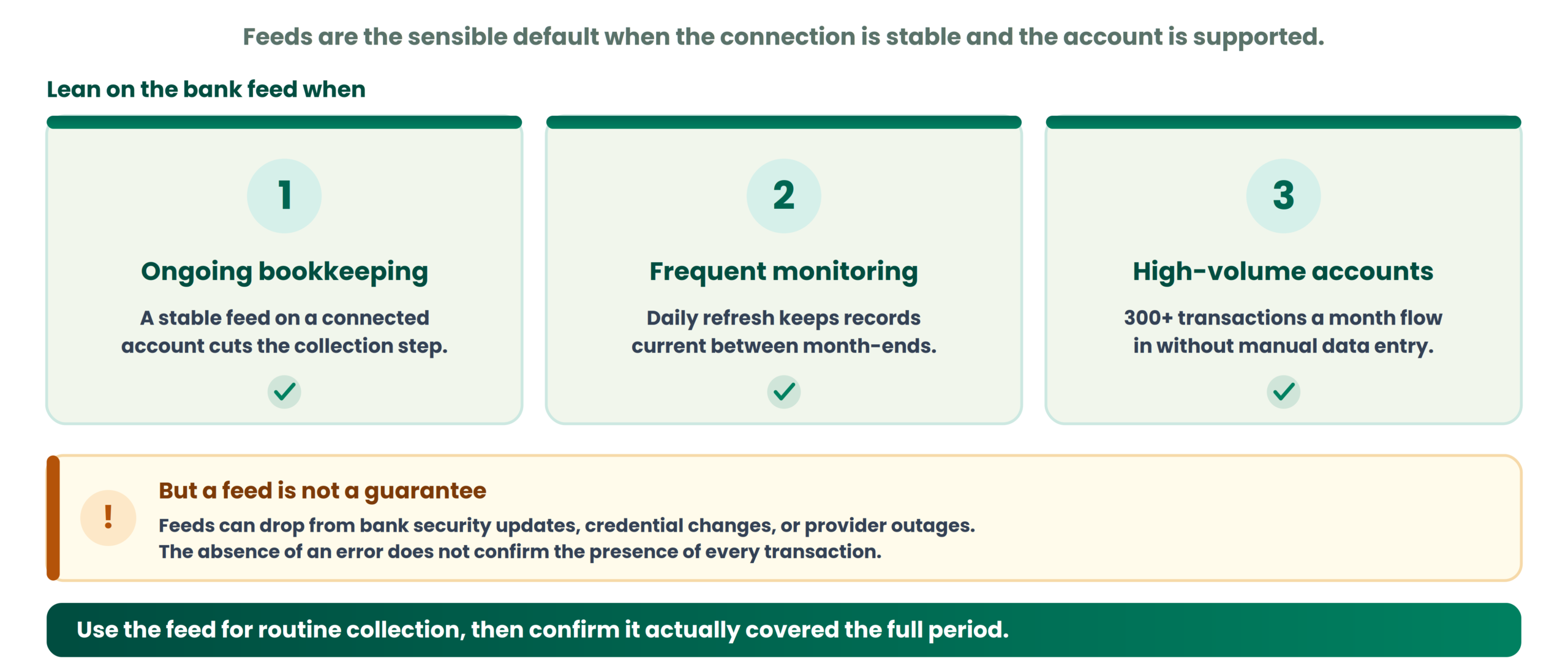
When should an accounting firm rely on bank feeds?
Ongoing bookkeeping for connected accounts
When a bank supports a stable feed and the accounting platform maintains a reliable connection, feeds reduce the manual effort of collecting transactions. The bookkeeper opens the platform, reviews what came in, categorizes it, and moves on. For firms processing dozens of client accounts monthly, that saved collection step adds up.
Frequent transaction monitoring
Feeds that refresh daily or more often let teams keep records closer to current. This helps clients who need regular reporting or weekly reviews rather than a month-end scramble. The feed does not eliminate review; it accelerates the first step of getting raw data into the system.
High-volume accounts with reliable connections
Consider a retail client with 300 transactions a month on a single operating account. If the feed is functioning and the connection has been stable for months, pulling those transactions automatically is operationally sensible. The team focuses on categorization and reconciliation rather than data entry.
The friction with feeds surfaces when you assume the connection will always work. Feeds can disconnect from bank security updates, credential changes, or provider outages. The absence of an error does not confirm the presence of every transaction.
When should an accounting firm use bank statement conversion?
New-client onboarding and historical transactions
A new client signs an engagement letter in September, and you need transactions from January onward. The bank feed, once connected, might supply the last 60 to 90 days. That leaves January through June uncovered. If the client can provide PDF statements for those months, conversion fills the gap. This is one of the most common and practical uses of statement conversion in accounting firms.
Unsupported banks and disconnected feeds
Some banks, credit unions, and international institutions do not support feeds on certain platforms. Some accounts, like older savings accounts or specialized trust accounts, fall outside feed coverage. When the connection is not an option, the statement is the source. Firms with clients across multiple countries encounter this regularly.
Closed accounts and older accounting periods
A client closed a business credit card six months ago, so the feed is gone, but the transactions still need to appear in the books. If the client retained the final statements, conversion can recover that data. The same applies to fiscal-year-end cleanup when prior-period adjustments require transaction-level detail from months the feed no longer covers.
Statement-level completeness checks
Bank statements typically include opening and closing balances. When you convert a statement and compare the extracted totals against those balances, discrepancies become visible. A balance check can help identify missing or duplicated entries. It does not, however, prove that every transaction is correctly categorized or that the books are fully reconciled, which is why extraction accuracy alone is not enough: accurate extraction is necessary but not sufficient.
What can go wrong when you rely on only one method?
The risks of relying only on bank feeds
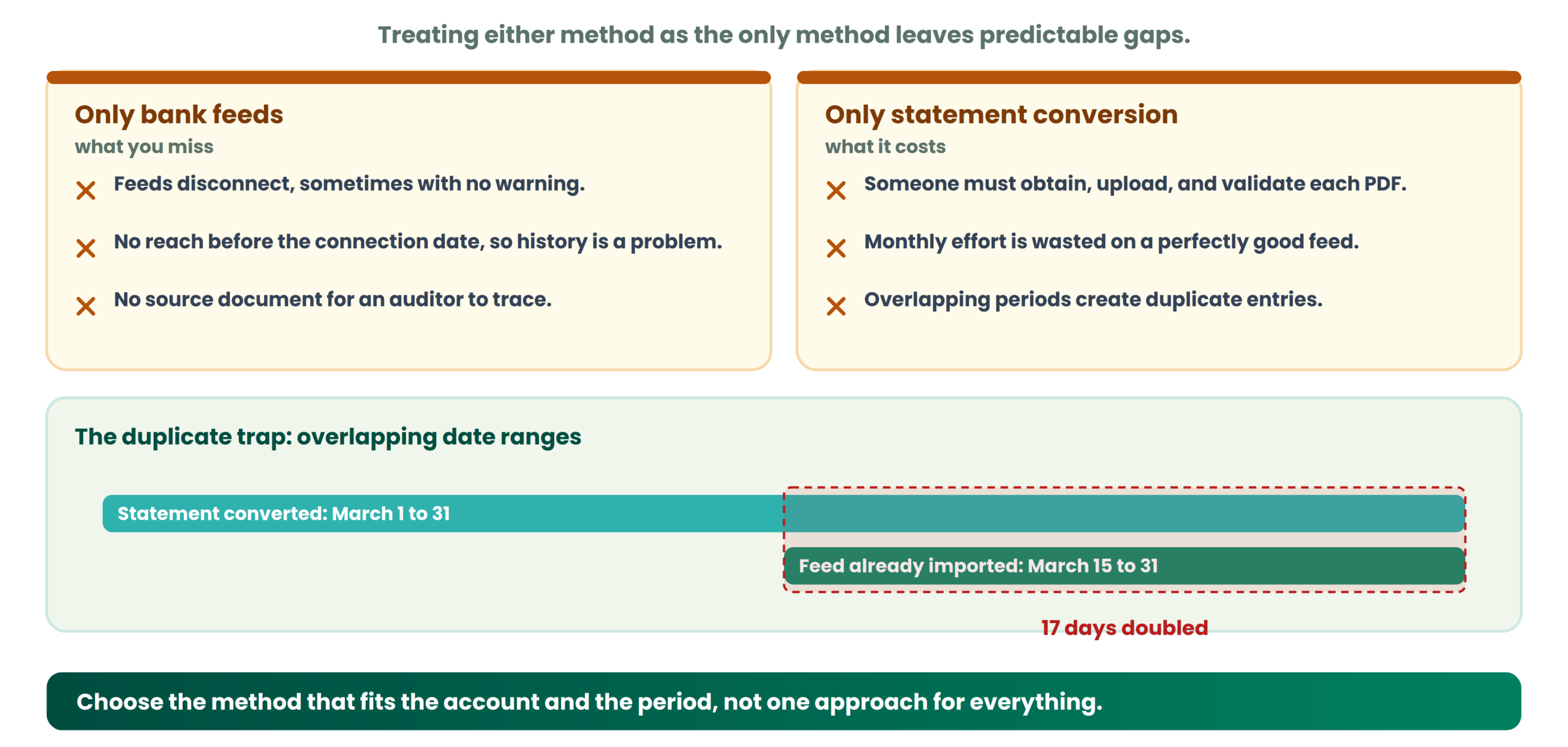
Feeds disconnect. Sometimes the platform shows a warning, sometimes it does not. A bookkeeper who assumes the feed is running without checking may discover a two-week gap at reconciliation time. Feeds also cannot usually reach back before their initial connection date, so for firms that only use feeds, onboarding a client with historical needs creates an immediate workflow problem. One more subtle point: feeds do not generate a source document, so if an auditor or the client asks where a transaction came from, the answer is just “the feed,” which may not satisfy everyone. These are potential issues, not inevitable problems with every feed.
The limitations of relying only on statement conversion
Statement conversion introduces its own friction. Someone must obtain the PDF, upload it, validate the extraction, check for formatting issues, and control the import date range. For a client with a perfectly functioning feed, doing all of that monthly adds unnecessary steps.
There is also the duplicate risk. If a team converts a statement covering March 1 through March 31, but the feed already imported March 15 through March 31, importing the full statement creates 17 days of doubled entries. Cleaning that up takes longer than the conversion saved. The practical conclusion: choose the method that fits the account and the period, rather than adopting one approach for every situation.
Can your firm use bank feeds and statement conversion together?
A practical hybrid workflow
Yes, and this is where most well-run firms land. Here is a sequence that works:
To standardize step five, use a bank statement intake checklist. For the import side, QuickBooks users can follow the guide on bank statement conversion for QuickBooks, and Xero users the process for converting bank statement data for Xero.
How to prevent duplicate transactions
Duplicates typically appear when date ranges overlap between the feed and a converted statement, or when the same statement is uploaded more than once. Prevention starts with defining the exact import period: check the platform for the latest feed transaction date, and set your statement conversion to begin the day after. Review existing records before importing, compare dates and amounts, and check descriptions or reference numbers where available. Use any matching or duplicate-detection controls the platform offers.
Do not automatically delete transactions that look similar. Two payments of $500.00 to the same vendor on the same day may be two legitimate, separate transactions. Investigate before removing.
How to investigate missing or mismatched transactions
When the reconciliation does not balance, compare the date ranges covered by the feed and the statement side by side, identify the exact transactions present in one source but absent from the other, review the original PDF and the conversion output for extraction errors, investigate possible pending, reversed, or consolidated entries, then correct the records and rerun the reconciliation check. Neither method automatically detects every error; that responsibility stays with the reviewer.
How to choose the right method for each client account
| Situation | Recommended Starting Point | Additional Check |
|---|---|---|
| Reliable feed, routine bookkeeping | Use the bank feed | Verify feed coverage dates monthly |
| New client, historical transactions needed | Bank statement conversion | Confirm statement availability for all required months |
| Unsupported bank or account type | Bank statement conversion | Validate extraction quality for that bank’s format |
| Interrupted or disconnected feed | Statement conversion for the gap period | Check for overlap with the last feed transaction |
| Closed account | Bank statement conversion | Obtain final statements before access expires |
| Unexplained reconciliation differences | Convert the statement and compare against feed data | Investigate transaction-level discrepancies |
| Multiple accounts, mixed connection quality | Decide per account | Document the source method for each account and period |
The decision is per account and per period, not per firm. Document which source provided each batch of transactions and what date range it covered. That documentation saves hours when questions arise later. The goal is to choose the appropriate approach, not create unnecessary duplicate work.
Where Bank2Ledger fits into a bank statement workflow
When statement conversion is the right approach, Bank2Ledger handles the processing steps between a raw PDF and structured, accounting-ready data. The workflow covers uploading bank statement PDFs, extracting transaction details, checking opening and closing balances against extracted totals, applying client-specific Charts of Accounts and categorization rules, flagging transactions that need attention, and exporting structured data for QuickBooks, Xero, and other supported accounting formats.
Bank2Ledger is not a bank feed provider. It does not create or maintain live connections to banks. Its role is to process the statements you already have, so the data entering your accounting platform is structured, validated, and categorized before anyone touches the ledger. For firms that process historical statements, fill feed gaps, or onboard clients with months of backlog, that is where it fits. The firm still needs to check existing transactions, prevent duplicates, and complete reconciliation.
Bank feeds vs bank statement conversion: decision checklist
Before importing transactions for any client account, run through these questions:
This checklist supports consistent decisions across your team. It does not replace professional judgment on individual accounts.
Frequently asked questions
Are bank feeds better than bank statement conversion?
Bank feeds are often more convenient for ongoing collection when the connection is stable and the bank is supported. Statement conversion is more practical for historical data, unsupported institutions, and investigating gaps. Neither is universally better; the right choice depends on the account, the period, and whether the feed actually covers what you need.
Can bank feeds miss transactions?
Yes, though it is not inevitable. Connection interruptions, provider outages, or credential changes can create gaps. Check the actual date range your feed delivered rather than assuming completeness.
Can I use bank feeds and bank statement imports together?
They complement each other well when you control date ranges and check for overlapping transactions before importing. The hybrid workflow described above prevents most issues.
Is bank statement conversion useful for historical bookkeeping?
It is one of the most common uses. When statements are available for periods the feed does not cover, conversion provides the structured data needed to complete those months.
Does converting a bank statement automatically reconcile the books?
No. Conversion structures transaction data. Reconciliation requires comparing the accounting records against source documents, resolving differences, and confirming balances. These are separate steps.
How can I prevent duplicate transactions when importing statements?
Define the exact import period, check the last transaction date from the feed, and begin your statement import the following day. Review for overlaps before finalizing, and never auto-delete similar-looking entries without investigation.
Should accounting firms stop using bank feeds if they use statement conversion?
No. A functioning feed remains useful for ongoing collection, and statement conversion serves a different purpose. Use each method where it fits rather than abandoning one for the other.
Build a workflow that uses both methods strategically
Bank feeds and bank statement conversion are not competing methods. They solve different parts of the same problem: getting complete, accurate transaction data into the books.
The firms that avoid surprises at reconciliation time are the ones that control date ranges, validate imported data before it hits the ledger, prevent duplicates through deliberate overlap checks, and document which source provided which transactions. Choose the right source for each account and each period, then verify what you imported.
Fill feed gaps without the manual entry
When statement conversion is the right tool, Bank2Ledger turns a raw PDF into structured, validated, accounting-ready data, so historical periods and feed gaps stop slowing down your close.