Last verified: 27 October 2026, against TallyPrime’s official bank statement and data-import documentation. Menu paths and messages change between TallyPrime releases, so confirm the current steps for your version before importing.
An accountant converts a client’s bank statement into an XML file, opens TallyPrime, and runs the import. TallyPrime reports completion, but some vouchers are missing, a ledger error appears, or the entries that did import need correction. The file was valid XML; the accounting import was not.
To troubleshoot TallyPrime XML import errors, identify the exact error or symptom, check the required masters and the voucher data, verify the XML structure and dates against TallyPrime’s import specification, correct the underlying issue, and review the import results before relying on the imported entries. A successful import message is not proof of a correct accounting result.
A valid XML file is not automatically a valid accounting import. The destination company needs the right masters, the transaction structure has to match what the import expects, and the vouchers must be checked after import. This guide works through the main failure points: the difference between the two import workflows, what to check first, the common errors (missing ledgers, rejected vouchers, invalid XML, date problems, debit-credit differences, duplicates, and imports that succeed but post incorrectly), and how to import and verify safely.
On this page
Bank Statement Import vs XML Voucher Import in TallyPrime
These are two different operations with different inputs and different failure modes, and conflating them sends troubleshooting in the wrong direction.
When is direct bank statement import appropriate?
TallyPrime’s direct bank statement import is built for the bank-reconciliation workflow, where a statement in a supported format is matched against existing book entries. Per the official TallyPrime bank statement documentation, this route accepts CSV or Excel statements downloaded from the bank portal, and it explicitly does not accept PDFs, or CSV and Excel files that were converted from a PDF. Check the current documentation for the supported formats and any bank-specific requirements before using it.
When is XML voucher import appropriate?
XML voucher import is a separate workflow that brings compatible accounting transactions into a TallyPrime company as vouchers. The file has to follow the structure the import expects, reference masters that exist in the destination company, and contain balanced accounting entries. A tool that converts a statement PDF into XML is preparing data for this second workflow; that conversion does not, by itself, make the output compatible with every TallyPrime configuration. See the TallyPrime data import FAQ for the supported structure.
| Workflow | Purpose | What to verify |
|---|---|---|
| Direct bank statement import | Bring a supported statement into the bank-reconciliation workflow | Statement format and supported bank requirements |
| XML voucher import | Import compatible accounting vouchers | XML structure, company masters, voucher fields and accounting validity |
| Manual transaction entry | Enter transactions directly into TallyPrime | Correct account, date, voucher type and accounting treatment |
What to Check Before Importing XML Vouchers into TallyPrime
Most XML import problems are decided before the import runs. The file arrives carrying assumptions about what exists in the destination company, and those assumptions are often wrong.
Confirm the correct company and financial period
Verify that the intended company is open and that the transaction dates fall within the appropriate period. The same XML can create valid but incorrect postings if it goes into the wrong company, and a voucher dated outside the active period may be handled differently depending on configuration and release, so do not assume every out-of-period transaction produces the same result.
Check the required ledgers and masters
Vouchers may reference ledgers or other masters that are missing from the destination company or do not match its naming. A reference to “Bank Charges” will not match a ledger named “Bank Charges A/c.” TallyPrime’s import documentation treats certain fields as mandatory, such as the Name and Group Name for a ledger, and the Voucher Type Name, Voucher Date, Ledger Name, and Ledger Amount for a voucher, so verify the exact master names and the intended mappings before importing. Remember that stock items, units, currencies, and voucher types can also need to exist.
Verify the XML structure and source data
An .xml extension does not guarantee compatibility. The file has to follow the structure the intended import expects, with valid field names and values. Compare the file against the documented sample structure, and inspect the source data for rounding differences, missing narrations, or incorrect transaction signs that would propagate into TallyPrime.
Back up company data and record the import details
Take a backup of the company before a bulk import, and record the source file, company, date range, and outcome, so the team can investigate problems or repeated imports. A partial or incorrect import may need the company restored to its pre-import state.
| Pre-import check | Why it matters | Action if it fails |
|---|---|---|
| Company and period | Helps avoid importing into the wrong company or period | Confirm the destination and dates |
| Ledger and master data | Vouchers may refer to unavailable masters | Correct the mapping or resolve the missing master |
| XML compatibility | The file may not match the import specification | Verify the generator and import requirements |
| Transaction amounts | Inconsistent values can affect voucher validity | Compare against the source data |
| Backup and import record | Supports recovery and investigation | Back up data and document the import |
Common TallyPrime XML Import Errors and How to Fix Them
For each symptom below: the likely causes, what to inspect, and the corrective action. Treat these as diagnostic starting points, not confirmed diagnoses; the exact message and your TallyPrime version decide the next step.
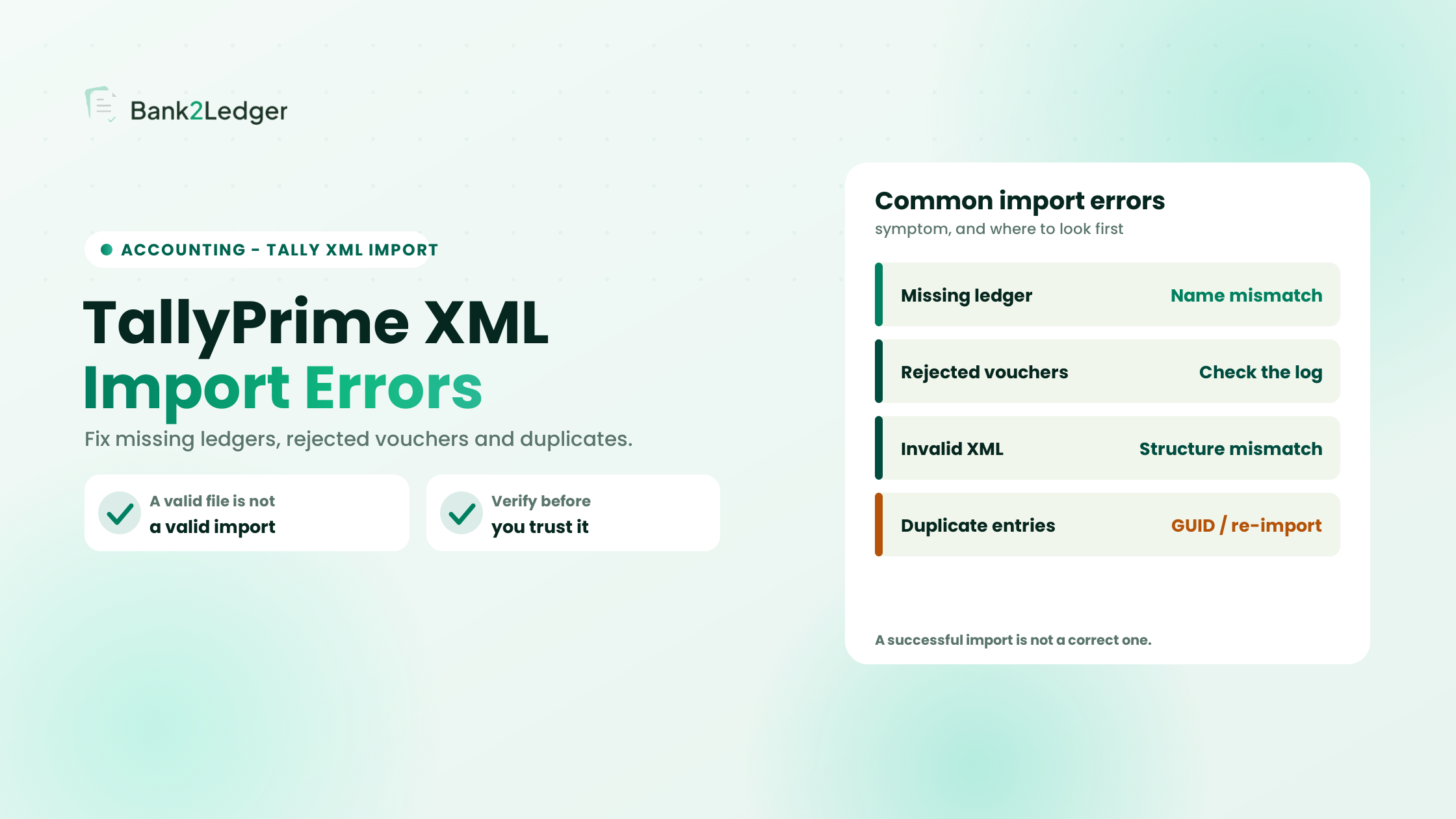
1. Missing ledger or master error
An imported voucher refers to a ledger or other master that is absent from the target company or does not match the expected name. Investigate whether the referenced ledger exists in the destination company, whether its name matches the imported reference exactly, whether the voucher references the correct ledger, and whether the intended mapping suits that transaction. The fix is to correct the reference in the source XML or resolve the master in TallyPrime. Do not auto-create every missing ledger: confirm the intended accounting treatment first, because inconsistent auto-created names cause problems in later periods.
2. Vouchers are rejected or only partly imported
When some transactions are accepted and others are not, the import summary is the source of truth. TallyPrime shows an import summary of what was processed and logs the details of failed entries to the Tally.Imp file, as described in the data import FAQ. Compare the number attempted against the number accepted, read the logged details for the failed entries, and check whether the failures share a common ledger, date, voucher type, or field. Group the exceptions by cause, correct the underlying data, and re-import only after confirming which transactions were already accepted. Do not assume every failure is an XML-format problem.
3. Invalid XML structure or unsupported field values
A file can be syntactically valid XML and still not match the structure the import expects. Inspect the required elements and attributes, the field names and supported values, the date and amount formatting, the voucher-type mapping, and the references to masters. Compare the file against TallyPrime’s documented sample structure before debugging individual voucher data, and do not treat a generic XML template as universally compatible unless it has been checked against your TallyPrime release and workflow.
4. Voucher dates or financial-period problems
Incorrect dates can cause period discrepancies or affect how transactions are reviewed. Dates in TallyPrime XML typically use the YYYYMMDD format, so a date written another way can be rejected; confirm the format expected by your release. Verify the date in the original statement, the date in the generated file, the format the import expects, and the company and financial period. Do not assume every date issue produces the same message.
5. Debit-credit mismatch or unbalanced vouchers
Every voucher must balance, and amounts must follow the intended accounting treatment. Example only: if a payment voucher debits an expense ledger ₹5,000 and credits the bank ledger ₹4,999.50, the 50-paise difference can cause the voucher to be rejected. Tax lines, discount allocations, and multi-ledger splits are where these differences usually hide. Inspect the transaction mapping and the voucher totals, and confirm that debit equals credit for every voucher at source, rather than adjusting amounts merely to make the import succeed.
6. Duplicate vouchers or repeated transactions
Duplicates arise when a file is imported more than once, when overlapping date ranges are used, or when the transactions already exist through another workflow. Re-importing a corrected full file after a partial success is a common cause. Check the company and ledger, the transaction date, the amount and description, any voucher reference, and the existing records and previous import logs. TallyPrime’s import configuration includes an option to overwrite a voucher when one with the same GUID already exists, so the deduplication behaviour depends on that setting and on how the source assigns GUIDs. A matching amount alone does not prove two entries are duplicates, and TallyPrime does not necessarily identify every repeated transaction automatically.
7. Import succeeds, but the accounting result looks wrong
A completion message does not prove that every transaction was mapped correctly. A payment can import as a journal, a credit can land on the wrong side, or a narration can be truncated, while the structure validated and the data was accepted. Inspect the voucher types, dates, ledgers, amounts, and narration, then compare the imported entries against the source statement and the intended accounting treatment. A technical import success is not the same as a correct accounting result.
TallyPrime XML Import Troubleshooting Table
Use this as a quick reference while troubleshooting. These are diagnostic starting points, not definitive diagnoses; let the exact message and your TallyPrime version decide the next step.
| Symptom | Possible cause | First check | Next action |
|---|---|---|---|
| Missing ledger | Master absent or name mismatch | Inspect the referenced ledger | Correct the mapping or master setup |
| Some vouchers rejected | One or more records fail validation | Review the import summary exceptions | Group and resolve the errors |
| XML import fails | Incompatible structure or field values | Verify the import specification | Correct the source or export format |
| Date-related issue | Incorrect date or period | Compare source and imported dates | Correct the date or destination setup |
| Debit-credit difference | Invalid mapping or amounts | Review voucher totals | Correct the accounting data at source |
| Duplicate entries | Repeated or overlapping import | Compare with existing records | Establish which entries are valid before re-importing |
| Imported result looks wrong | Incorrect mapping or voucher type | Inspect imported vouchers | Correct and verify the affected records |
How to Import and Verify XML Vouchers Safely
A repeatable workflow, not a click-by-click tutorial: menu paths shift between TallyPrime releases, so follow the current official instructions at the import step.
1
2
3
4
5
6
7
8
| Stage | What to check | Purpose |
|---|---|---|
| Preparation | Backup, company and period | Reduce avoidable operational mistakes |
| Data validation | XML structure and source fields | Identify malformed or incomplete data |
| Master checks | Ledgers and mapping | Reduce reference errors |
| Import | Summary and exceptions | Establish what was accepted or rejected |
| Verification | Voucher details and ledgers | Identify incorrect accounting results |
| Reconciliation | Source data versus final records | Investigate remaining differences |
A clean import summary is necessary but not sufficient. It confirms structure; only ledger-level and transaction-level review confirms the accounting is right.
How to Prevent Duplicate and Incomplete Imports
Prevention and recovery both start with a record. Maintain a simple import register for each import: client, source file, statement period, account, import date, and the attempted, accepted, and rejected counts. For the broader workflow of turning statements into accounting software cleanly, see how to convert bank statement PDFs into accounting software.
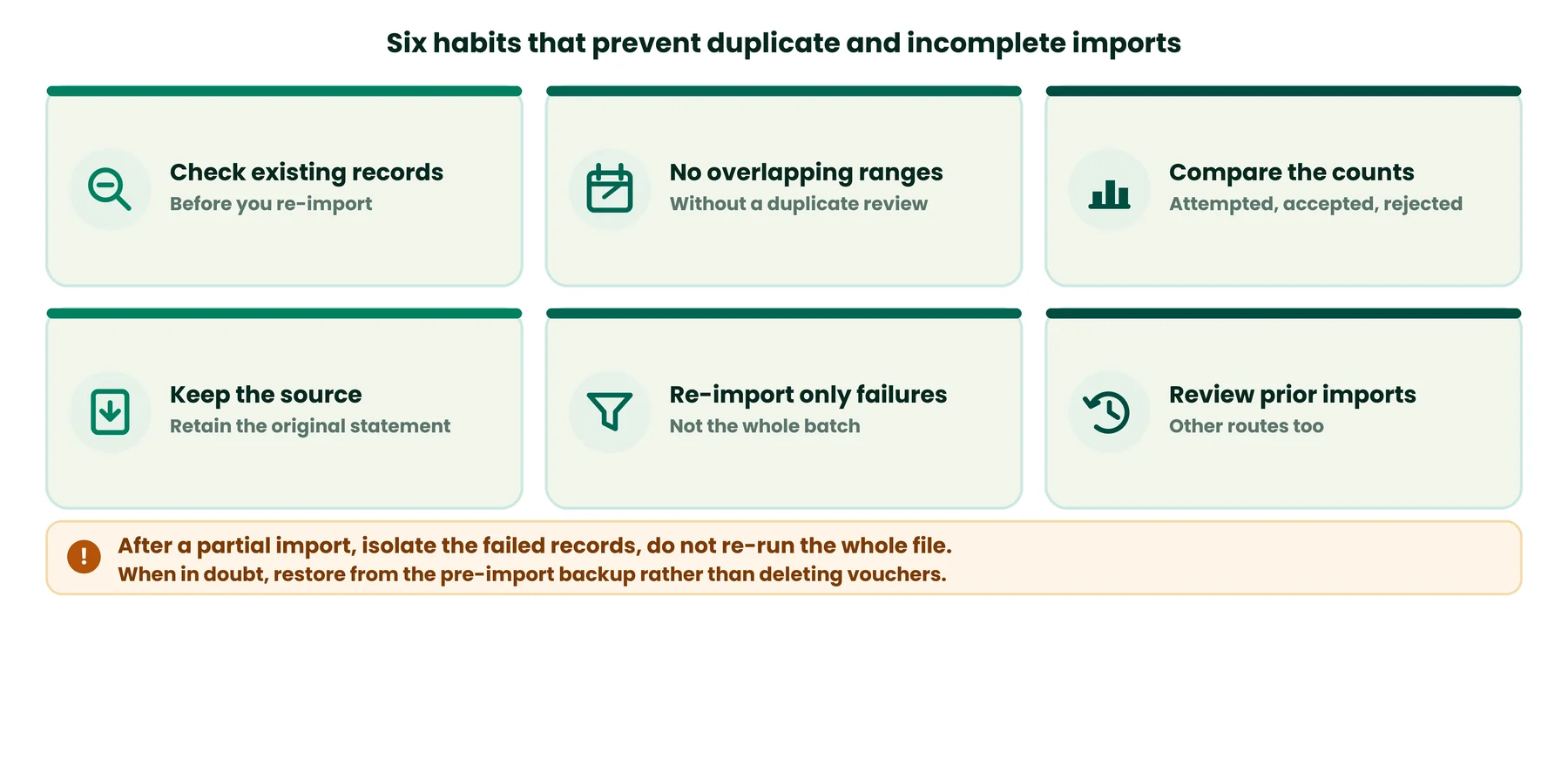
- Check existing records in the destination company before re-importing.
- Avoid overlapping date ranges without a duplicate review.
- Compare the attempted, accepted, and rejected record counts after each import.
- Retain the original source statement.
- Correct and re-import only the failed transactions rather than blindly repeating the whole batch.
- Review any transactions that may already have been imported through another route.
If a partial import already created some vouchers, do not re-import the entire file. Isolate the failed records and decide explicitly whether matching entries should overwrite or be skipped. Deleting imported vouchers to start fresh is risky, because the correct recovery depends on what was created and how the company records those entries; when in doubt, restore from the pre-import backup rather than deleting duplicate-looking vouchers without investigating their accounting purpose.
Where Bank2Ledger Fits into the TallyPrime Workflow
The troubleshooting above stands on its own, independent of any tool. Bank2Ledger sits at the earlier, extraction stage: it extracts transactions from statement PDFs, including scanned statements, checks that the opening balance plus the lines equals the closing balance, categorizes transactions against each client’s chart of accounts, and holds low-confidence lines in a review queue for approval. It exports ledger-mapped vouchers as TallyPrime XML, with the ledger names kept intact, alongside formats for other software such as QuickBooks and Xero.
Used that way, a conversion tool prepares cleaner, reviewed source data, but the output still has to meet the destination workflow’s requirements: the masters it references must exist in the company, the mapping must be correct, import exceptions still need investigation, and the final accounting records should be reviewed after import. No conversion tool guarantees a successful import or resolves every TallyPrime error; the post-import verification in this guide still applies.
TallyPrime XML Import Checklist
A compact checklist accountants can reuse before each import:
- Correct company selected and active.
- Relevant financial period confirmed to cover all voucher dates.
- Company data backed up.
- Required masters and ledgers checked, with exact matching names.
- XML format and import workflow verified against the current specification.
- Transaction dates and amounts checked.
- Voucher mappings reviewed.
- Existing entries checked for duplicates.
- Import summary and exceptions reviewed and recorded.
- Imported vouchers checked against the source statement.
- Remaining discrepancies investigated before treating the import as complete.
Frequently Asked Questions
How do I import XML vouchers into TallyPrime?
Use TallyPrime’s data-import workflow, which is separate from its bank statement import. Prepare an XML file that matches the structure the import expects, make sure all referenced masters exist in the destination company, and follow the import route documented for your TallyPrime release. Consult Tally Solutions’ current data-import documentation for the menu path in your version.
Why does TallyPrime show a missing ledger error?
The imported voucher references a ledger that does not exist in the destination company, or the name differs. “Bank Charges” and “Bank Charges A/c” are different strings to the importer. Compare every ledger name in your XML against the company’s master list before importing, and correct the reference or resolve the master.
Can I import a PDF bank statement directly into TallyPrime?
No. TallyPrime’s direct bank statement import accepts CSV or Excel statements downloaded from the bank portal, and its documentation states it does not accept PDFs or CSV/Excel files converted from a PDF. To get PDF transaction data in, you need a separate step that produces a compatible import format, such as an XML voucher import.
Why are some vouchers rejected during XML import?
Possible causes include incompatible data, missing masters, invalid fields or formats, unsupported voucher types, or duplicate identifiers. TallyPrime shows an import summary and logs the details of failed entries to the Tally.Imp file, so review the actual logged details rather than guessing.
How do I avoid duplicate vouchers during import?
Check existing records, the import history, and any date-range overlap before importing again. After a partial import, isolate and re-import only the failed records rather than the whole file, and understand how your source assigns voucher identifiers and how your import configuration handles matching entries.
How do I verify that XML vouchers were imported correctly?
Review the import summary, then check voucher details, the relevant ledgers, and the source transactions. Compare the voucher count, total debits, total credits, dates, and voucher types against the source. An import-success message alone is not proof of complete accounting correctness.
Conclusion
Reliable TallyPrime XML importing depends on compatible data, correct masters and mapping, careful exception handling, and post-import verification. The most useful next step when something fails is to identify the exact error or symptom, check its likely cause against the official documentation, correct the underlying problem, and verify the resulting accounting records before relying on them. A successful import message confirms structure, not accuracy, so the final check is always at the ledger and transaction level.
Prepare cleaner source data for your Tally imports
Bank2Ledger extracts and categorizes bank statement transactions against your chart of accounts and exports ledger-mapped vouchers as TallyPrime XML, with the ledger names intact, so your import step starts from reviewed data.