A client sends over six months of bank statement PDFs on a Friday afternoon. The team needs structured transactions inside the accounting software before month-end close. Manual entry would eat hours nobody has. An online conversion tool could process everything in minutes.
But those PDFs contain account numbers, supplier names, payroll references, loan repayments, and a full picture of the client’s cash-flow patterns. Uploading them to a third-party service is a data-processing decision, and the firm owns that decision.
So is it safe to upload client bank statements to a converter? It can be, but only when the provider’s actual controls, contractual terms, retention practices, and third-party arrangements hold up under specific questioning. A tool that converts a PDF accurately has answered the extraction question. It has not answered the security question. Those are two separate evaluations, and accuracy alone is not enough for a firm handling other people’s financial data.
Uploading client bank statements to a conversion tool can be appropriate, but only after the provider’s data handling, security controls, contractual commitments, and your firm’s own procedures have been evaluated. No converter should be assumed safe simply because it extracts data accurately. This article gives firms a repeatable framework for that evaluation, covering the full document lifecycle from upload through processing, storage, access, retention, and deletion.
Why client bank statements require special care
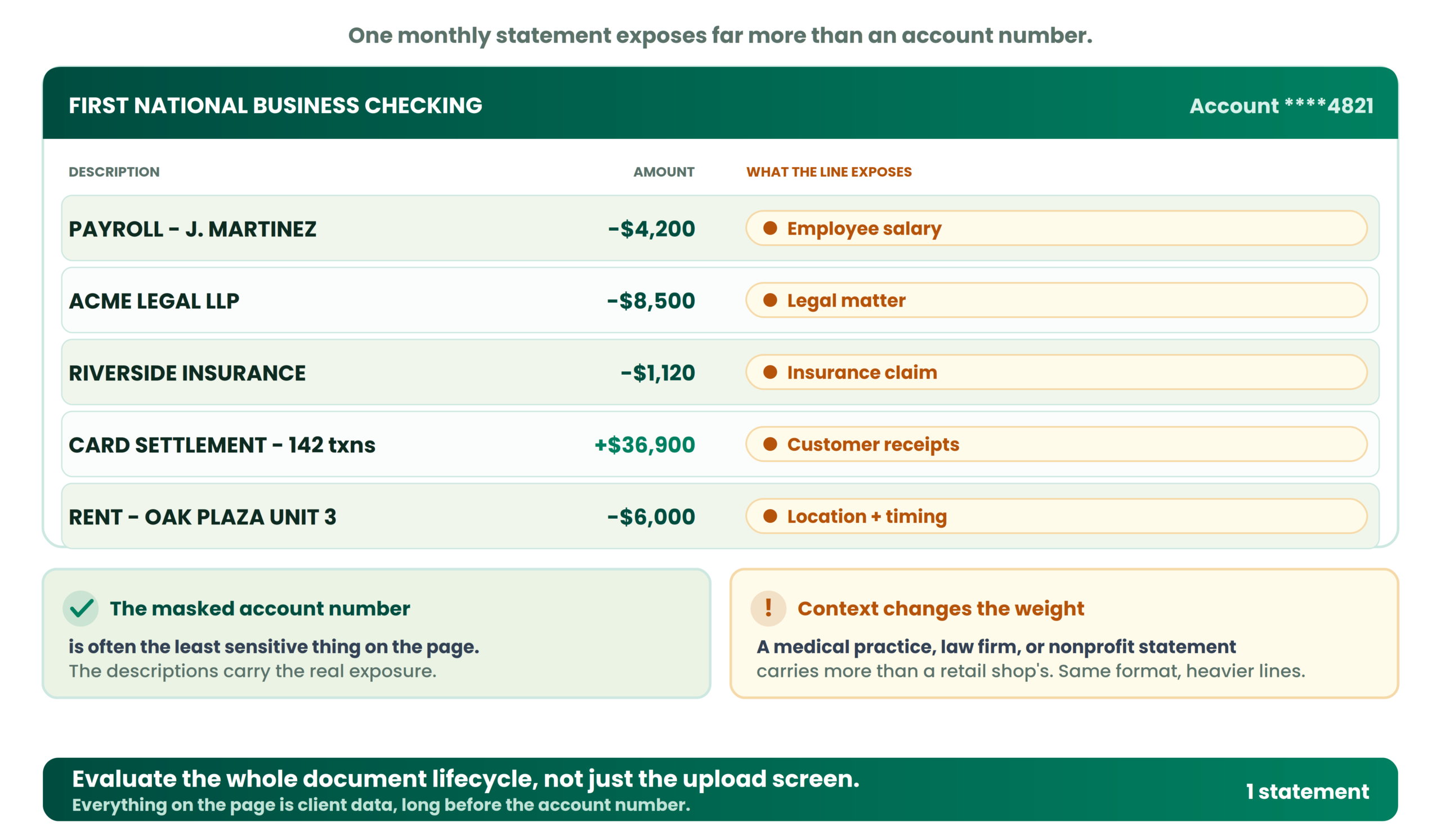
A single bank statement can expose more than an account number. Transaction descriptions alone might reveal supplier relationships, employee salary payments, legal fees, insurance claims, or purchases a client considers commercially sensitive. Recurring payment patterns show cash-flow timing. Payee references can identify customers. Even a “clean” business statement with no obvious personal data still maps the financial activity of the account holder in detail.
The sensitivity also depends on context. A statement from a medical practice, a law firm, or a nonprofit carries different risks than one from a retail shop, not because the format differs, but because the transaction descriptions carry different weight if exposed.
Accounting firms handle these documents under client agreements, internal policies, and, depending on jurisdiction, regulatory obligations. The FTC Safeguards Rule under GLBA, for example, requires covered firms, including many tax preparers and bookkeepers, to maintain a written information security program covering how sensitive financial information is handled. Whether or not that specific rule applies to your firm, the principle holds: your engagement terms and your own Written Information Security Plan should describe how third-party tools fit into the workflow.
One thing that trips up firms repeatedly is focusing on the account number while ignoring everything else on the page. A transaction description reading “PAYROLL – J. MARTINEZ – $4,200” is personal data. A line item for a competitor’s consulting invoice is commercially sensitive. Evaluate the complete document lifecycle, not just the upload screen.
Is it safe to upload client bank statements to an online converter?
The answer depends on which online converter and what it actually does with the file. Providers vary widely in architecture:
- Some process the file transiently and discard it quickly.
- Some store documents to support reprocessing or history.
- Some route data through third-party infrastructure, AI services, or subprocessors.
- Some retain copies in backups or logs even after the user-facing file is deleted.
These are possible designs. No single architecture is universal. The phrase “secure bank statement converter” on a marketing page tells you almost nothing without specifics behind it. A polished website, accurate extraction, a generic security statement, or the simple fact that a tool uses AI does not establish that it is suitable for confidential documents.
A bank statement converter should be evaluated as a data-processing service, not just a file-conversion utility. If a vendor cannot explain its data handling in clear, specific terms, pause approval until the uncertainty is resolved.
Security and privacy checks every accounting firm should make
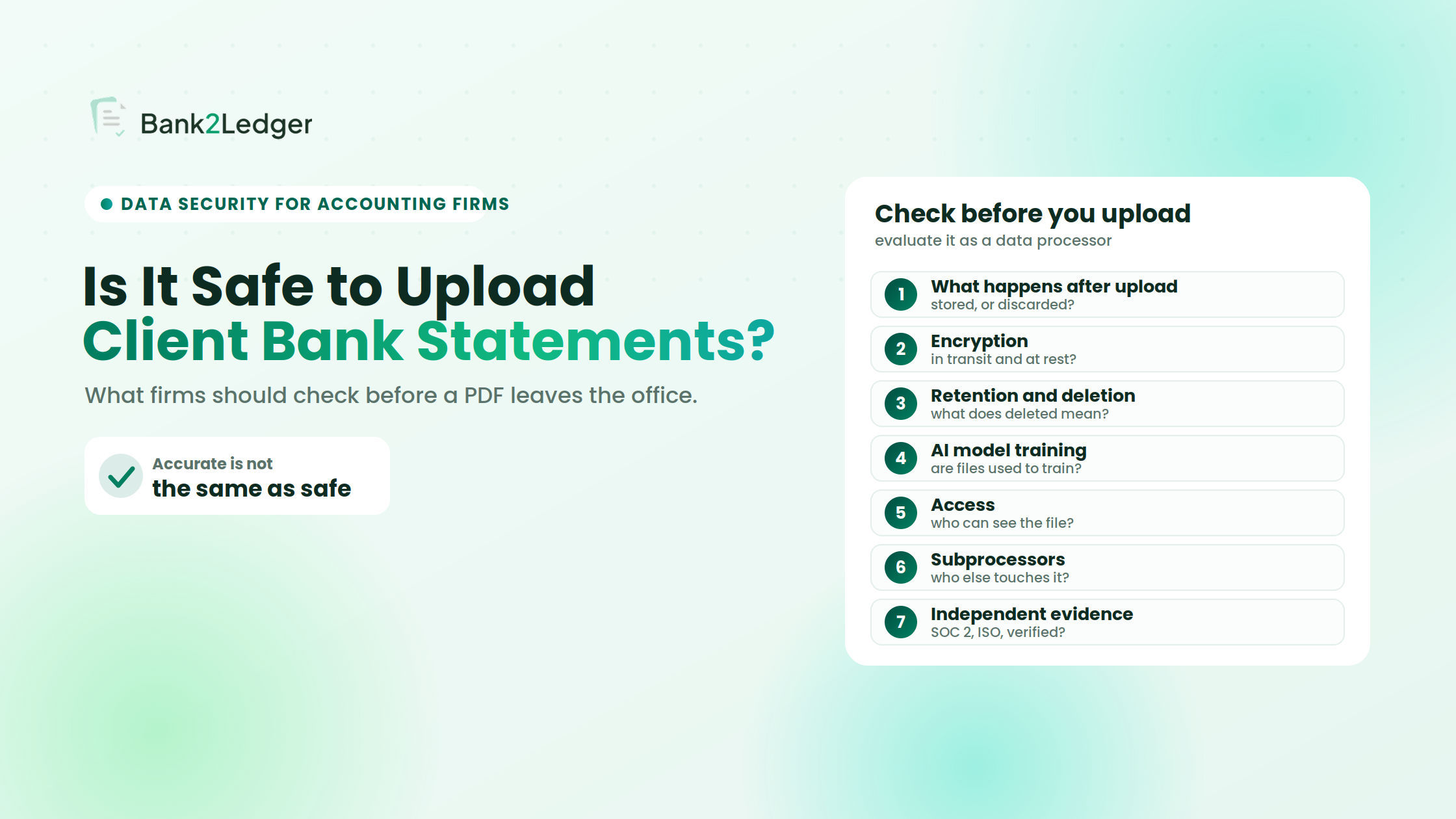
This is the core of the evaluation. Seven areas, each with the questions that actually matter and why they matter to a firm.
1. What happens to the file after upload?
There is a difference between receiving a document for processing, temporarily storing it, retaining it for later access, and sharing it with infrastructure providers. A provider might delete the uploaded PDF but keep extracted transaction data indefinitely. Or it might retain the original for troubleshooting while telling users the conversion is complete. These are possible arrangements, not universal facts about every tool.
Questions to ask
- Where is the document processed, and is it stored after processing?
- Is extracted transaction data retained separately from the source PDF?
- Can previous documents or results be accessed later?
- Does the provider disclose third-party processing?
- What happens when a user closes the session or deletes a file?
For a deeper look at what typically happens between a PDF upload and your accounting software, the Bank2Ledger guide on bank statement processing walks through the lifecycle stage by stage.
2. Is data encrypted in transit and at rest?
Encryption in transit protects data moving between your browser and the service. Encryption at rest protects stored data on the provider’s systems. Both matter, but encryption alone does not answer every security question. A file can be encrypted at rest while still accessible to every employee at the vendor. Access permissions, account protection, application-level security, and operational procedures sit on top of encryption. Think of encryption as the floor, not the ceiling.
Questions to ask
- Does the vendor explicitly document both forms of encryption?
- What data and systems does the documentation say are covered?
- Can supporting security documentation be reviewed before you commit?
3. How long are files retained, and what does deletion mean?
This is where the gap between marketing and reality gets wide. “Deleted” from the user interface may not mean deleted from backups, processing logs, cached previews, or disaster-recovery systems. Distinguish between retention of uploaded PDFs, extracted transaction data, account and audit records, exported files, and backup copies, each of which may have its own timeline for removal.
Questions to ask
- Is the retention period documented, and can the firm configure it?
- What happens when a file is deleted, and what happens when an account is closed?
- Are backup-retention limitations explained?
- Does the provider explain how exported files are handled?
4. Are client documents used to train AI models?
Using a model to process a document is different from using that document to train or improve a model. The distinction matters for client financial data, and it is one that generic AI tools like ChatGPT handle very differently from purpose-built accounting converters. AI processing does not automatically mean model training, but firms should verify rather than assume, and should check that any policy covers the original PDF, the extracted transaction data, and any third-party AI services involved.
Questions to ask
- Are uploaded statements used to train or improve models?
- Does the policy cover both the original document and the extracted transaction data?
- Are external AI providers involved, and do the provider’s commitments extend to them?
- Is the commitment documented in the applicable terms, not just a blog post?
5. Who can access uploaded files?
User permissions, account roles, vendor employee access, administrative access, shared accounts, and staff turnover all affect who can see a client’s statement after upload. Least-privilege access means the junior processing team should reach only assigned client folders, not the entire firm workspace. Client-data segregation prevents one client’s transactions from appearing in another’s workspace. Multi-factor authentication, where available, adds a layer beyond passwords. Only describe these controls as present when the provider’s documentation confirms them.
Questions to ask
- Who can access uploaded files, and is access limited by role?
- How is vendor support access governed?
- What happens to access when an employee leaves?
- Can the firm keep different clients’ information separated?
6. Does the vendor use third parties or subprocessors?
Cloud hosting, OCR processing, AI services, analytics, and customer support may each involve a different company. A vendor’s subprocessor register tells you whether another company handles part of the pipeline. Using third parties is not automatically unsafe. The issue is whether their involvement is transparent and governed by appropriate agreements, and whether you understand what each one processes.
Questions to ask
- Which third parties may process client information, and what do they receive?
- Where is that processing performed?
- What privacy and security commitments apply to them?
- How are material changes communicated?
7. Is there independent security evidence?
A certification badge is useful evidence, but it does not replace a firm-specific risk assessment. A SOC 2 Type II report provides evidence that relevant controls operated over a period, not merely that policies existed on one day. ISO 27001 certification covers an information security management system within a defined scope. These are not interchangeable, and neither guarantees that incidents cannot occur. If a vendor cites either, verify the scope, the validity period, and whether it covers the specific service you are considering.
Questions to ask
- What independent evidence can the vendor supply?
- Is the evidence current?
- Does it cover the service being considered?
- Are its limitations or exclusions clear?
Privacy policy, DPA, NDA, and security certification: what is the difference?
These instruments serve different purposes and do not substitute for one another. A privacy policy, a contract, and an independent assurance report answer different questions, and treating them as interchangeable is a common mistake.
| Document or evidence | What it helps establish | What to verify |
|---|---|---|
| Privacy policy | Published data-handling practices | Whether it covers uploaded files, extracted data, retention, deletion, and third parties |
| Data Processing Agreement | Contractual terms for covered processing | Scope, responsibilities, subprocessors, and deletion provisions |
| Non-Disclosure Agreement | Confidentiality obligations within scope | Covered information, parties, exclusions, and duration |
| SOC 2 report | Examination of controls within a defined scope | Report type, examination period, scope, and exceptions |
| ISO 27001 certification | Certified security management system within scope | Validity, certified organization, and scope |
Whether a DPA, an NDA, or another measure is necessary depends on the parties, the jurisdiction, the data involved, and applicable obligations. No single document is universally required in every situation. If your firm’s specific requirements are unclear, get qualified legal advice rather than guessing, and review each document against your own operational and legal needs.
How to evaluate a bank statement converter before approving it
The checks above become repeatable when you run them as a defined process. This is a vendor-review sequence a firm can apply to any converter before it touches live client documents.
A worked example shows why the process matters. A provider documents encryption clearly but cannot explain what happens to backups after a file is deleted. The right move is not to approve or reject on the spot. Record the unanswered question, seek clarification, and make the approval decision only once the uncertainty is resolved.
What accounting firms should never do with client bank statements
Some habits create unnecessary exposure no matter how good the tool is. Each of these has a safer alternative.
Redaction can reduce unnecessary exposure where appropriate, but it must not remove information essential to the accounting task, and the redaction tool itself should be assessed before confidential documents are uploaded to it. Clear staff procedures and approved workflows are what hold all of this together.
The common traps in converter security evaluations
A few patterns come up again and again when firms review converters. Each has a specific response that cuts through the ambiguity.
| What you run into | The specific response |
|---|---|
| Vendor says “files are deleted” but cannot explain backup retention | Ask about production storage, temporary processing, backups, logs, and derived data separately |
| Privacy policy mentions “security” but not uploaded documents | Request written confirmation that the policy covers user-uploaded financial documents and extracted data |
| Converter produces accurate output, so the team skips security review | Treat extraction accuracy and data-handling safety as two independent assessments |
| A “deleted” file reappears when support accesses the account | Ask whether support staff can view or retrieve documents after user-initiated deletion |
Cloud-based vs. local bank statement conversion
There is an active debate about whether firms should ever use cloud-based converters for client statements, or whether local processing is the only defensible choice. Some practitioners argue that any upload to a third-party server creates unacceptable exposure. Others counter that a well-controlled cloud service with encryption, access controls, and contractual protections can be more secure than a local machine with outdated software and no backup policy. The honest position is that “well-controlled” has to mean verified controls, not marketing language. The deployment label alone cannot establish safety.
| Factor | Cloud-based conversion | Local conversion |
|---|---|---|
| Processing | Uses the provider’s environment | Uses a local device or controlled environment |
| Data exposure | Depends on provider practices and controls | Depends on device, software, storage, and backups |
| Maintenance | May be partly managed by the provider | Usually more responsibility for the firm |
| Collaboration | May support centralized workflows | May require extra sharing arrangements |
| Retention | Depends on provider policies and system design | Depends on local storage and backup practices |
| Security assessment | Review provider controls and contractual terms | Review device security, access, and storage |
Local processing may reduce external data transfer, but it does not protect against compromised devices, weak access controls, insecure backups, or staff mistakes. Choose the model that fits your data, workflow, and documented security requirements, then verify the controls regardless of which one you pick.
Where Bank2Ledger fits into a secure pre-accounting workflow
Use the framework above to evaluate any converter, Bank2Ledger included, rather than taking a vendor’s word as the final answer. Against that framework, the documented Bank2Ledger workflow supports the pre-accounting steps between a PDF and your accounting software:
- Uploading bank statement PDFs.
- Extracting transaction information.
- Checking the opening balance, transactions, and closing balance, and flagging discrepancies.
- Applying client-specific Charts of Accounts and categorization rules.
- Reviewing transactions that need additional attention.
- Exporting prepared data for supported accounting workflows.
On security specifically, Bank2Ledger publishes statements on its website that data is encrypted in transit and at rest, that data is deleted according to a schedule the user sets, and that uploaded data is not used to train models. Treat these as the vendor’s own representations, not as independent verification, and confirm they still appear on the official site before you rely on them. Review the current documentation and decide whether the workflow meets your firm’s requirements.
Bank statement conversion security checklist for accounting firms
Save this for your next vendor review. It is an operational aid, not a certification or a guarantee of safety.
Frequently asked questions
Is it safe to upload client bank statements to an online converter?
It can be appropriate when the provider’s data handling, security controls, contractual terms, and deletion practices have been verified against the firm’s own requirements. Safety is not a property of the product category. It is the outcome of a specific evaluation covering encryption, access, retention, third parties, and the firm’s internal procedures around approved tools.
What security features should a bank statement converter have?
Encryption in transit and at rest, clear retention and deletion practices, access management with role separation, transparent third-party processing, and documented security policies that can be reviewed. No single feature is sufficient on its own, and supporting documentation matters as much as the feature itself.
Can AI tools use uploaded bank statements for training?
Processing a document with an AI model and training a model on that document are different activities. The provider’s documented terms and any third-party AI arrangements determine the answer, and the policy should cover both the original PDF and the extracted data. Verify rather than assume.
How long should a bank statement conversion tool retain client files?
There is no universal number. Retention should align with the firm’s workflow needs, contractual commitments, applicable obligations, and the provider’s documented deletion capabilities. Shorter is generally better for files that have already been processed and reviewed.
Is local bank statement conversion safer than cloud conversion?
Not inherently. Local processing may reduce external data transfer, but it remains exposed to compromised devices, weak access controls, and insecure backups. A well-controlled cloud service can be more secure than a poorly maintained local machine. The deployment model alone does not establish safety.
Does an accounting firm need a DPA before using a converter?
That depends on the relationship, jurisdiction, data being processed, and applicable obligations. If the converter processes personal data on behalf of the firm, a DPA may be required under certain frameworks. Get legal review when uncertain rather than assuming either way.
What if a provider cannot explain its retention or deletion practices?
Pause approval. A vendor that cannot clearly describe what happens to your client’s data after processing has not yet answered the security question. Wait for a sufficiently clear answer before using the tool with live client documents.
Make vendor approval a process, not a guess
A conversion tool should be assessed on the full document lifecycle, upload, processing, access, storage, retention, and deletion, rather than judged solely by how accurately it reads a PDF. The seven checks, the comparison of contractual documents, and the evaluation steps in this article give your firm a repeatable framework for that assessment.
Document your decision, test with appropriate sample data first, establish clear staff rules about which tools are approved for client documents, and revisit the decision when a provider updates its terms or your workflow changes. The next problem most firms hit after choosing a tool is building the intake workflow that gets statements to it securely in the first place.
Evaluate Bank2Ledger against this framework
Bank2Ledger prepares and validates bank-statement data in the pre-accounting workflow: extraction, balance verification, client-specific categorization, and exception review, with published statements on encryption, user-set deletion, and no model training. Review them against the checks in this article and decide whether they meet your firm’s requirements.