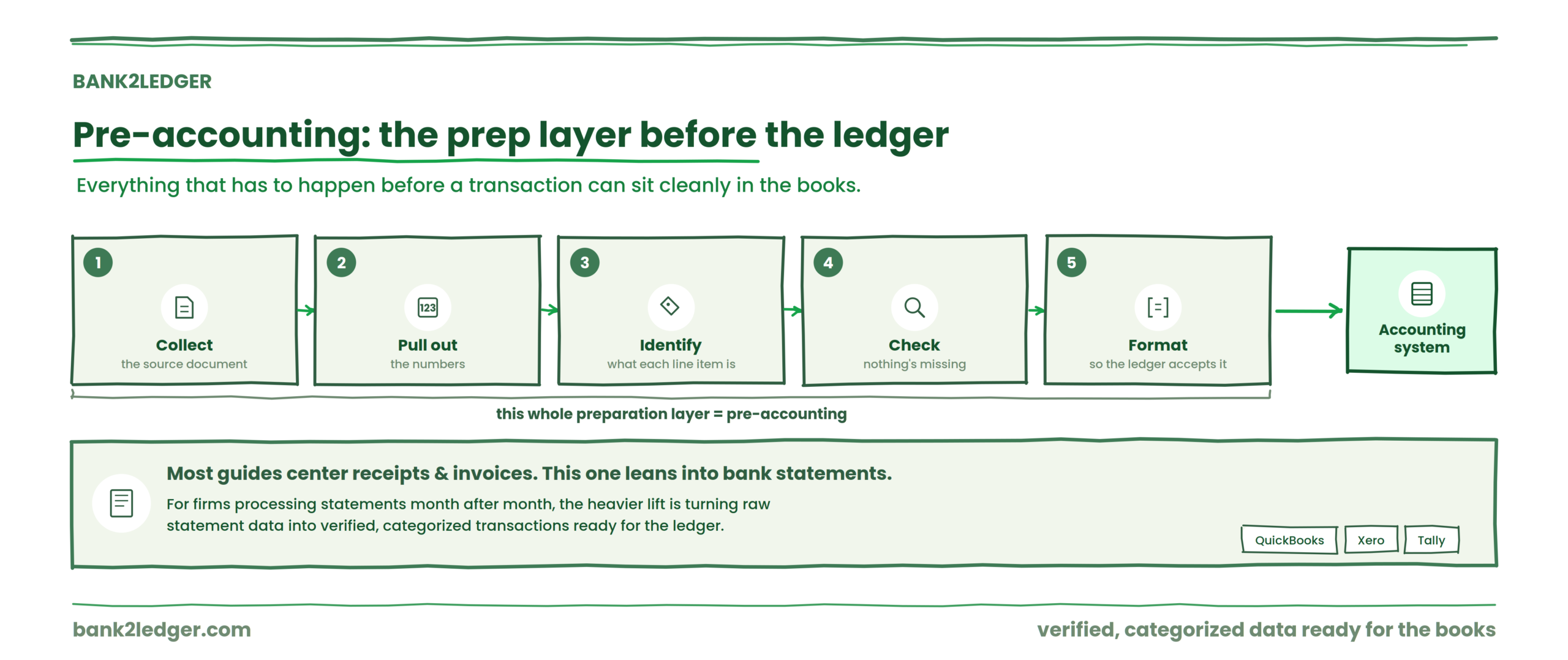
Before a single transaction can sit cleanly inside an accounting system, somebody has to get it there. Collect the source document. Pull out the numbers. Figure out what each line item actually is. Check that nothing’s missing. Format everything so the ledger will accept it.
That preparation layer is what many accounting teams call pre-accounting.
Most competing definitions center the concept on receipts and invoices, and those absolutely belong in the picture. But for bookkeeping firms processing bank statements month after month, the heavier lift is often turning raw statement data into verified, categorized transactions ready for QuickBooks, Xero, Tally, or whatever system the client uses. That’s the angle this guide leans into, because it’s the one that rarely gets adequate treatment.
By the end you’ll understand where pre-accounting sits in the accounting workflow, what it includes, how it differs from bookkeeping and accounting proper, where automation helps (and where it doesn’t), and how to evaluate software that claims to handle it.
Who this is for
If you run or work inside a multi-client bookkeeping practice, an outsourced accounting operation, or a CPA/CA firm that processes bank statements as part of monthly close, this is directly relevant. Same goes for practice managers trying to standardize workflows across staff, and controllers at SMEs tired of spreadsheet cleanup before month-end.
If you’re looking for a step-by-step tutorial on converting a specific PDF statement into an import file, that’s a different problem. Read how to convert bank statement PDFs into accounting software instead.
What is pre-accounting?
Pre-accounting is the preparation and validation of financial data before it is formally recorded in an accounting system. It can include collecting documents, extracting transaction data, checking it, categorizing transactions, resolving missing information, and preparing the data for bookkeeping or accounting.
Terminology varies. Some organizations use “pre-accounting” narrowly for document collection and filing. Others stretch it to cover transaction classification, reconciliation preparation, and accounting-system handoff. Software vendors like Dext, SparkReceipt, Moss, and Phacet each draw the boundary differently. Phacet, for instance, explicitly frames pre-accounting as turning raw business documents into ledger-ready data before posting. SparkReceipt emphasizes scanning and extraction. Dext leans into automated data capture and categorization.
None of them are wrong. They’re describing different slices of the same preparation layer.
A working definition that covers the full scope: pre-accounting is everything that happens between receiving a financial source document and formally recording its contents in the general ledger.
Where pre-accounting fits in the accounting process
The flow looks like this:
→
Financial documents and bank statements
→
Pre-accounting
→
Accounting system and general ledger
→
Reconciliation
→
Financial reporting
Pre-accounting sits after documents exist but before anything gets posted. It’s the staging area. Skip it or do it badly, and the downstream work (reconciliation, reporting, close) inherits every error, every missing category, every formatting quirk from the source.
What pre-accounting includes
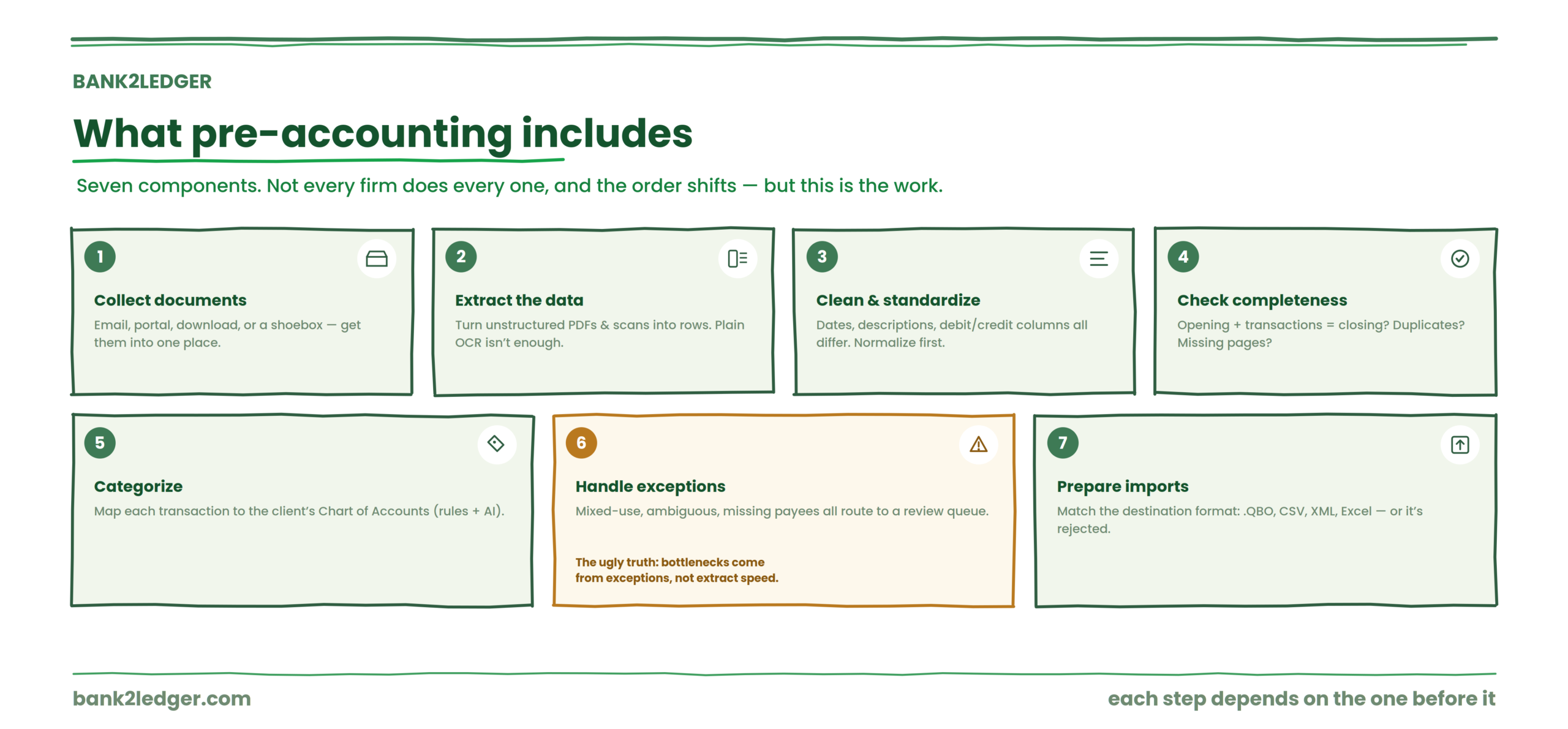
Not every organization performs every task below, and the order shifts depending on the workflow. But these are the components.
Collecting financial documents
Statements arrive by email, client portal, download, or sometimes a shoebox. The first job is getting them into one place. In practice, the first week of any new client engagement is usually dominated by chasing documents, establishing naming standards, and building a reliable collection channel.
Extracting financial data
Unstructured PDFs and scanned images need to become structured rows: date, description, amount, balance. Plain OCR isn’t enough here. Raw text output frequently loses row structure and sign formatting, which means a parser has to understand column boundaries, not just characters.
Cleaning and standardizing data
Dates come in different formats. Descriptions are inconsistent between banks. Amounts might be in different columns for debits and credits. Normalization makes all of this uniform before categorization can begin.
Checking completeness and accuracy
Does the opening balance plus all transactions equal the closing balance? Are there duplicate entries? Missing pages? This verification step catches extraction errors before they propagate.
Categorizing transactions
Each transaction gets mapped to a category, ideally from the client’s specific Chart of Accounts. This is where coding rules and AI suggestions come in.
Handling exceptions
Some transactions don’t fit neatly. Mixed-use expenses, ambiguous descriptions, missing payees. These get routed to a review queue for human judgment. The ugly truth: reconciliation bottlenecks usually come from exception handling, not extraction speed.
Preparing accounting-system imports
The final output needs to match whatever format the destination system expects (.QBO, CSV, XML, Excel). Formatting errors at this stage mean rejected imports and rework.
The pre-accounting pipeline
This is the framework that ties those components together:
→
Extract
→
Normalize
→
Verify
→
Categorize
→
Review
→
Prepare
→
Handoff
Each stage depends on the one before it. You can’t categorize what you haven’t extracted. You can’t verify what you haven’t normalized. And you shouldn’t hand off what you haven’t reviewed.
Pre-accounting vs bookkeeping
| Pre-accounting | Bookkeeping |
|---|---|
| Prepares financial data | Records and maintains financial transactions |
| Extracts information from source documents | Posts transactions to the ledger |
| Organizes and structures raw data | Maintains the books over time |
| Applies preliminary categorization | Applies full accounting treatment |
| Flags exceptions for review | Resolves transactions within the accounting system |
| Produces accounting-ready output | Works inside the accounting system |
The boundary isn’t identical in every firm. Some combine parts of pre-accounting and bookkeeping into the same workflow, especially smaller practices where one person handles everything from PDF to posted entry.
Pre-accounting vs accounting
Pre-accounting is preparation. Bookkeeping is recording and maintaining. Accounting is the broader discipline: financial interpretation, reporting, compliance, advisory, and decision support.
These aren’t rigid legal categories. They’re useful distinctions for understanding where different types of work and judgment apply.
Why pre-accounting matters for accounting firms
The expensive part of monthly bookkeeping isn’t usually the accounting judgment. It’s the preparation required before that judgment can begin.
Consider what a typical firm deals with: PDF statements from dozens of banks, each with different layouts. Scanned documents with OCR artifacts. Client-specific Charts of Accounts that differ wildly. Transaction descriptions that say “POS 4829371” instead of anything useful. Month-end deadlines stacking up across 30 clients simultaneously.
Staff spend hours on statement cleanup, exception handling, and review queue backlog before a single entry reaches the ledger. That’s pre-accounting work, and it scales linearly with client count unless something changes.
The preparation layer is where the hours go
Bank2Ledger handles the extract, verify, categorize, and review steps so your team spends time on accounting judgment, not statement cleanup, across every client.
What pre-accounting looks like for a bank statement
Take a concrete example. A 120-page PDF bank statement arrives from a client.
The pre-accounting workflow: PDF → extract transactions → validate transaction count → check opening and closing balance relationship → categorize transactions → apply client-specific rules → flag uncertain transactions → review exceptions → prepare ledger or import file → send to accounting system.
If you manually inspect five random rows and find dates, amounts, or descriptions misread in two or more, stop and fix extraction rules before proceeding. If the ending balance doesn’t reconcile after clearing exceptions, investigate timing differences or missing entries. These stop/go checks prevent bad data from reaching the ledger.
The ugly truth about pre-accounting
The clean pipeline described above is the goal. Reality is messier.
| Problem | The weird fix |
|---|---|
| Transactions extract but import with wrong signs | Rebuild export templates around column positions, not just text output |
| Bank feed disconnects mid-close | Use secure CSV export as a backup workflow |
| “Clean” statement data still won’t reconcile | Run a manual exception pass for unmatched items (timing differences, deposits in transit, missing fees) before blaming extraction |
| Categories keep changing between clients | Standardize client templates and rule libraries before scaling |
| Staff still spend hours reviewing | Tighten pre-validation so only genuine exceptions hit the queue |
Generic automation breaks on unusual statement layouts, duplicate transactions, and bank-specific formatting quirks. That’s why the biggest operational gains tend to come after the first few close cycles, once bank-specific templates and COA mapping rules have stabilized.
Can pre-accounting be automated?
Parts of it, yes. Document ingestion, data extraction, normalization, duplicate detection, recurring transaction rules, categorization suggestions, formatting, and export preparation are all highly automatable.
What usually requires human oversight: unusual transactions, ambiguous categories, complex accounting treatment, exceptions, and final approval. Automation that claims to eliminate human review entirely should raise questions, not confidence.
Rules-based automation vs AI categorization
This is where practitioners disagree, and the disagreement is live.
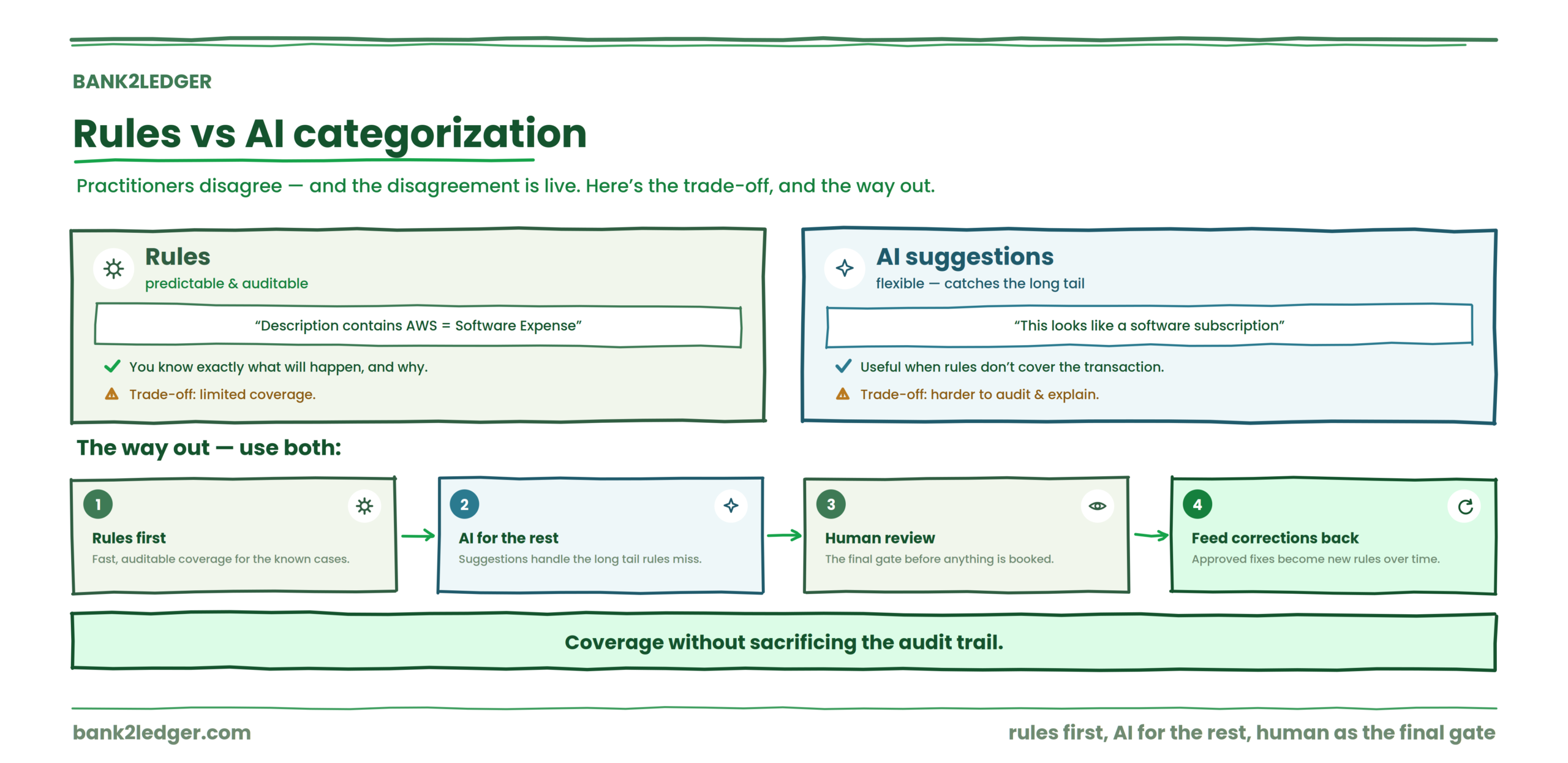
Rules are predictable and auditable. “Description contains AWS → Software Expense.” You know exactly what will happen and why.
AI suggestions are flexible. “This transaction appears to be a software subscription.” Useful when rules don’t cover the transaction, but harder to audit and explain.
Some firms want rules only, because auditability matters more than coverage. Others want AI to handle the long tail of uncategorized transactions. I land on the side of using both: rules first, AI suggestions for what rules miss, human review as the final gate, and approved corrections feeding back into the rule library. That workflow gives you coverage without sacrificing the audit trail.
What role does AI play in pre-accounting?
AI can assist with document understanding, transaction extraction, merchant recognition, categorization suggestions, pattern detection, and anomaly identification.
AI should not automatically replace professional judgment, approval decisions, accounting policy choices, or unusual transaction treatment. If you’re curious about where general-purpose AI tools like ChatGPT fit (and where they break), there’s a detailed breakdown in what accountants need to know about using ChatGPT for bank statement conversion.
What good pre-accounting software should do
If you’re evaluating tools, here’s a practical checklist:
Pre-accounting software prepares and organizes data. It sits upstream of accounting software (QuickBooks, Xero, Tally, Sage), which maintains the formal records. These are complementary layers, not competing ones. For a comparison of tools in this space, see which bank statement processing tool works better for accounting firms.
How Bank2Ledger handles bank statement pre-accounting
Bank2Ledger is built specifically for the bank-statement slice of pre-accounting: turning raw client statements into verified, categorized, accounting-ready data. It maps onto the pipeline described above, stage by stage.
Extract & verify
It extracts transaction-level data from PDF and scanned statements, including long documents up to 300 pages, then checks the extraction against the statement’s opening and closing balances so errors surface before anything moves downstream.
Categorize with client-specific rules
Categorization runs against each client’s own Chart of Accounts using readable, auditable rules. When you correct a categorization, that correction becomes a rule, so the same transaction maps correctly next month without rework.
Review exceptions, not everything
Uncertain transactions route to a review queue with source-page traceability, so a reviewer sees exactly where each entry came from on the original statement. Human judgment stays on the genuine exceptions instead of the whole file.
Prepare, hand off & scale
Verified data exports in the format the destination system expects, spanning QuickBooks, Xero, Tally, Sage, and Excel. Multi-client workspaces keep each client’s rules and Chart of Accounts separate, so the workflow holds up across a full book of clients.
In short, Bank2Ledger owns the extract, verify, categorize, and review stages of the pipeline and hands clean data to your accounting system, which is exactly where the manual hours tend to pile up. To see it applied to a live statement, read see how Bank2Ledger handles bank statement pre-accounting.
Frequently asked questions about pre-accounting
What is pre-accounting in simple terms?
Pre-accounting is the work of collecting, extracting, organizing, and verifying financial data before it gets recorded in an accounting system. It turns raw documents like bank statements, receipts, and invoices into clean, categorized entries that are ready for bookkeeping software to accept.
What is the difference between pre-accounting and bookkeeping?
Pre-accounting prepares data for the ledger. Bookkeeping records and maintains it inside the ledger. In some firms these overlap, but the distinction matters when you’re trying to figure out which part of the workflow to automate or delegate.
Is pre-accounting part of accounting?
Yes, in the sense that it’s a stage within the broader accounting workflow. It sits before formal recording. Without it, the data entering the accounting system is unverified and unstructured.
Can pre-accounting be automated?
Extraction, normalization, rule-based categorization, and export formatting can all be automated. Exception handling and final approval still need a human.
What is pre-accounting software?
Software that handles the preparation layer: ingesting documents, extracting data, categorizing transactions, and producing accounting-ready output. It works before and alongside accounting software, not instead of it.
Can AI perform pre-accounting?
AI can assist with extraction, categorization, and pattern recognition. It should not replace professional review, approval, or accounting policy decisions. The useful model is AI-assisted, human-approved.
Who is responsible for pre-accounting?
It depends on the firm. In some practices, junior staff handle it. In others, it’s outsourced or automated. The key question is whether the person or system doing it can maintain accuracy and an audit trail.
Is bank statement processing part of pre-accounting?
Absolutely. For firms that process bank statements as their primary source data, statement extraction, verification, and categorization are the core of pre-accounting work.
Does pre-accounting replace bookkeeping?
No. Pre-accounting feeds bookkeeping. It removes the manual preparation that used to be bundled into the bookkeeper’s job, freeing them to focus on recording, reconciliation, and review.
The next problem most firms hit after getting pre-accounting right is reconciliation, specifically how to reconcile efficiently once the extracted data reaches the ledger. That’s a different workflow, and it deserves its own guide.
Stop losing advisory time to statement prep
If your firm processes bank statements for multiple clients and the preparation work is eating into advisory time, see how Bank2Ledger handles bank statement pre-accounting. First statement is free.