A bank statement with 400 transactions lands in your inbox on a Monday morning. The extraction is clean. Every line, amount, and date pulled correctly. And then the actual work starts.
AMZN MKTPLACE, $480. Is that office supplies? Inventory? Marketing materials? The bank statement doesn’t say, and neither does the merchant name. The answer depends entirely on the client, their Chart of Accounts, their accounting conventions, and sometimes a conversation with the business owner you haven’t had yet.
For accounting firms processing dozens of clients, automatic bank transaction categorization isn’t really about whether software can read a transaction. It’s about whether the system can consistently apply the right accounting treatment within a specific client’s workflow. That distinction shapes everything that follows.
By the end of this piece, you’ll understand why categorization is harder than extraction, how rules and Charts of Accounts interact, where AI fits (and where it doesn’t), and what a reliable categorization workflow actually looks like in practice.
Who this is for (and who should read something else)
If you’re a bookkeeper, accounting firm, or outsourced finance team processing client bank statements monthly, this is your article. Especially if you’re managing multiple clients with different Charts of Accounts and you’ve felt the pain of inconsistent categorization scaling badly.
If you’re looking for how to convert a bank statement PDF into usable data in the first place, that’s a different problem. Start with preparing categorized bank transactions for accounting software instead.
What automatic bank transaction categorization actually is
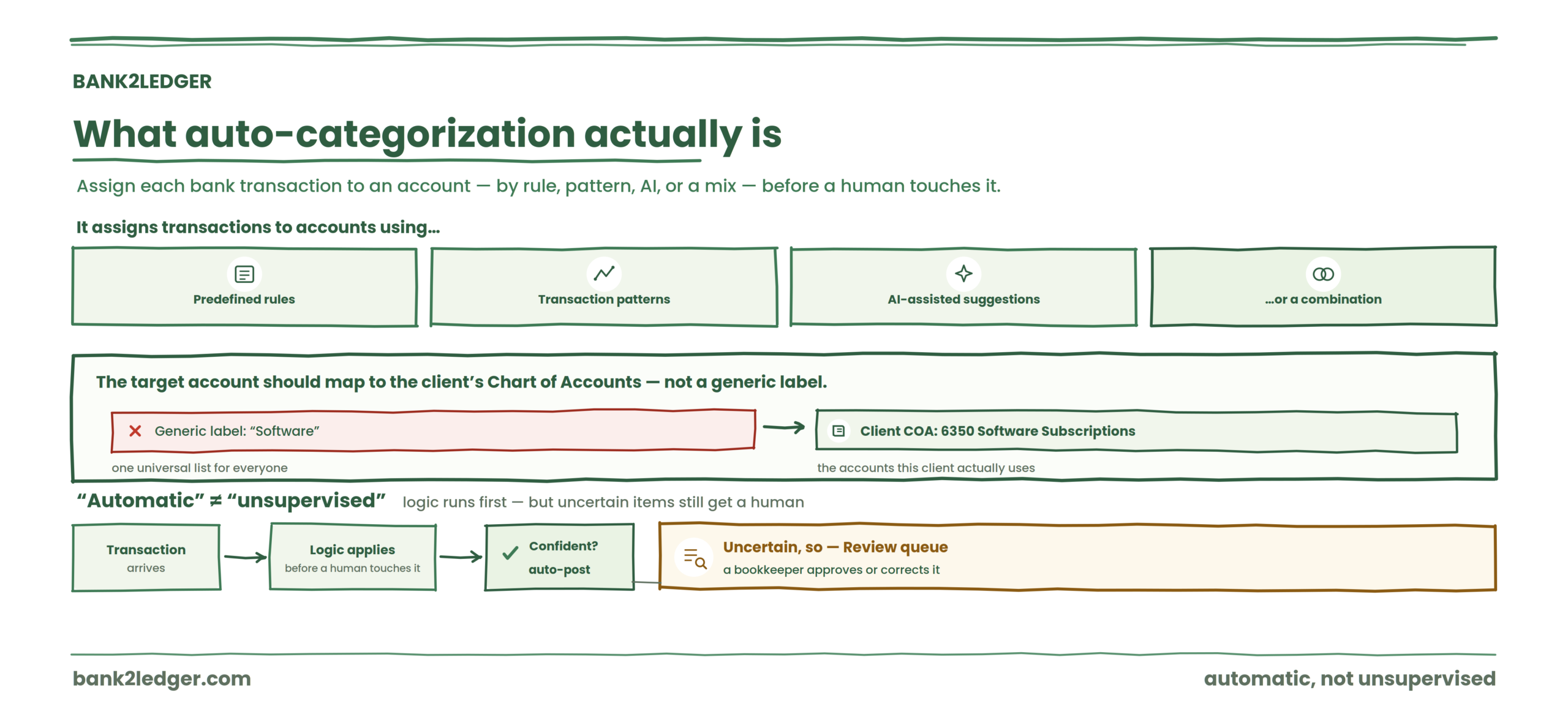
Automatic bank transaction categorization assigns bank transactions to accounting categories or accounts using predefined rules, transaction patterns, AI-assisted suggestions, or some combination of these. In professional bookkeeping, the target category should align with the client’s Chart of Accounts rather than a generic list of expense labels.
The word “automatic” does real work here. It means the system applies logic before a human touches the transaction. But “automatic” doesn’t mean “unsupervised.” The best workflows still route uncertain items to a review queue.
The distinction most articles miss: extraction vs categorization
Bank transaction extraction and bank transaction categorization are separate processes. Extraction determines whether the transaction data was captured correctly. Categorization determines which accounting account should be assigned to it.
A transaction can be perfectly extracted and completely miscategorized.
Take AMAZON MARKETPLACE, $480. The amount is right. The date is right. The description matches the source PDF. Extraction: perfect. But the correct account could be office supplies, inventory, equipment, or marketing materials. The bank statement alone doesn’t carry that information.
This matters because tools that report high extraction accuracy are answering a different question than “did the transaction land in the right account?” Treating extraction accuracy as categorization accuracy is one of the most common mistakes firms make when evaluating automation, and it’s a gap that general-purpose AI approaches to accounting workflows tend to paper over.
Why categorization is harder than it looks
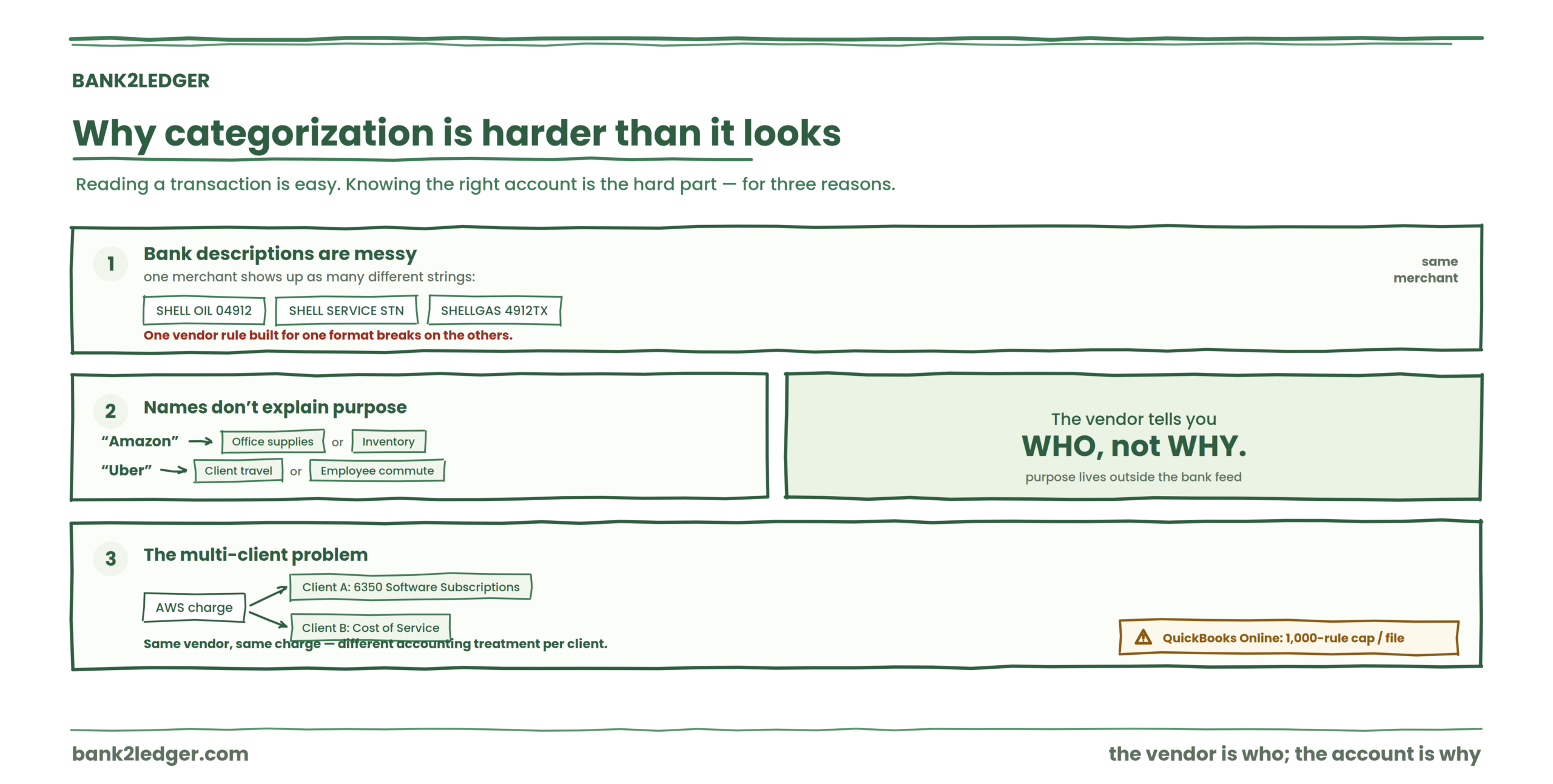
Bank descriptions are messy. The same merchant can appear as SHELL OIL 04912, SHELL SERVICE STN, or SHELLGAS 4912TX across different banks and different months. A single vendor rule built for one format breaks on the others.
Merchant names don’t explain purpose. “Amazon” could be office supplies for one purchase and inventory for the next. “Uber” might be client travel or employee commuting. The vendor tells you who, not why.
Then there’s the multi-client problem. Client A categorizes AWS charges as 6350 Software Subscriptions. Client B treats the same charge as Cost of Service. Same transaction, same vendor, different accounting treatment. QuickBooks Online documentation surfaces a 1,000-rule cap per company file, which becomes a real constraint when you’re scaling categorization across dozens of clients with fragmented merchant patterns.
The Chart of Accounts isn’t a suggestion list
The Chart of Accounts defines the accounts available within a specific client’s accounting structure. It’s the taxonomy that controls reporting, P&L structure, and consistency.
| Transaction | Generic label | Client-specific account |
|---|---|---|
| AWS | Software | 6350 Software Subscriptions |
| Bank fee | Bank charges | 6800 Bank Charges |
| Payroll provider | Payroll | 6200 Payroll |
Generic categorization (Starbucks → Meals, Uber → Travel) is what most introductory articles teach. It’s also what breaks first in practice. If the Chart of Accounts is poorly designed, automation just speeds up bad coding. Automatic categorization becomes genuinely useful when the system maps transactions into the accounts the client actually uses, not a universal default list.
How rules categorize bank transactions
A categorization rule is a conditional instruction. IF description contains “GUSTO,” THEN assign 6200 Payroll.
Rules can match on description keywords, payee fields, amounts, transaction direction (money in vs money out), or combinations of these. QuickBooks supports a single bank rule with up to five conditions and lets users reorder rule priority.
Description-based rules work well for recurring vendors with consistent text. “AWS” in the description reliably maps to software subscriptions. Payee-based rules can be cleaner when the raw description is noisy but the payee field is standardized. Amount-based rules alone are risky (plenty of unrelated charges hit $25.00), but combined with a description match, they get precise. Amount = -25.00 AND description contains "FEE" → 6800 Bank Charges is tighter than either condition alone.
Rule order: the silent source of miscategorization
This is where I’ve seen firms burn hours without realizing what went wrong.
A broad rule catches “AMAZON” and maps everything to Office Supplies. A specific rule catches “AMAZON AWS” and maps to Software. If the broad rule fires first, AWS charges silently land in Office Supplies. The feed looks clean. Nobody catches it until the P&L review.
Specific rules need to run before general rules. Every rule-based bookkeeping system that handles this well emphasizes rule priority, and the ones that don’t create what practitioners call “silent miscodings”: transactions that look categorized correctly in the feed but pollute reports downstream.
The Categorization Decision Stack
This is the framework that captures how categorization actually works in a professional workflow:
Each layer depends on the one above it. Bad source data breaks rules. Missing rules skip to context. A misaligned Chart of Accounts makes even correct matches land in wrong accounts.
Rules vs AI: not old vs new
Rules work best when the transaction pattern is predictable, the client already knows the treatment, auditability matters, and consistent treatment is required. AI suggestions are useful when no rule exists, the transaction is unfamiliar, or patterns need to be identified from historical data.
| Rules | AI suggestions | Human review | |
|---|---|---|---|
| Strength | Predictable, auditable, consistent | Handles novel transactions | Catches context-dependent edge cases |
| Weakness | Doesn’t adapt to new patterns | Can miscategorize without context | Doesn’t scale |
| Best for | Recurring vendors, known treatment | First-time transactions, pattern discovery | Ambiguous or high-value items |
The strongest workflow isn’t one or the other. It’s rules first, then suggested categorization for unmatched transactions, then human review, then approved corrections that become new reusable rules.
That feedback loop matters more than which technology runs the initial pass.
What happens when no rule matches
A good system doesn’t guess and silently post. It flags the transaction, suggests a possible category where it can, shows the basis for that suggestion, and routes it to a review queue. The bookkeeper approves or corrects. Then, critically, the system offers to turn that correction into a future rule.
February: SHELL 40912 appears. No rule exists. The bookkeeper assigns 6510 Fuel & Travel. The system asks: apply this to future matching transactions? March: the same pattern auto-categorizes. That’s the 5-Step Categorization Loop in action.
→
Categorize
→
Flag
→
Review
→
Remember
The goal isn’t zero review. It’s shrinking the manual review queue to the true exceptions.
A practical example
Client: Meridian Cafe Ltd.
| Code | Account |
|---|---|
| 4000 | Sales Income |
| 6200 | Payroll |
| 6350 | Software |
| 6410 | Office Supplies |
| 6510 | Fuel & Travel |
| 6800 | Bank Charges |
| Description | Rule / Decision | Category |
|---|---|---|
| GUSTO PAYROLL | Description contains GUSTO | 6200 Payroll |
| AWS EMEA | Payee rule | 6350 Software |
| SHELL | Approved correction rule | 6510 Fuel |
| MONTHLY FEE | Amount + description | 6800 Bank Charges |
| AMZN MKTPLACE | No confident match | → Review queue |
That last line is the important one. AMZN MKTPLACE could be office supplies, could be inventory, could be something else entirely. A system that auto-posts it as “Office Supplies” because Amazon usually means office supplies is making an accounting decision it isn’t qualified to make.
Multi-client categorization: where generic systems fail
Client A treats AWS as Software Subscriptions. Client B treats AWS as Cost of Service. If your rules are global rather than client-specific, one of those clients gets wrong categorization every single month.
Rules should belong to the client workflow, not exist as universal assumptions. Oracle documents both segment rules and account rules as formal mapping approaches for Chart of Accounts transformations, which reflects how seriously enterprise systems take this separation. Smaller firms need the same principle even if the tooling is simpler.
Rules should belong to the client, not the tool
Bank2Ledger keeps a separate Chart of Accounts and rule set for every client, so one client’s treatment of a vendor never leaks into another’s books.
The ugly truth: common ghost errors
| Problem | Root cause | The fix |
|---|---|---|
| Transactions auto-categorize “correctly” but reports look wrong | Bad COA design or wrong transaction type | Rebuild the COA before tuning rules |
| Broad vendor rules fire on unrelated charges | Conditions too generic | Add negative conditions, split by money in/out |
| Same vendor appears in multiple categories | Merchant string inconsistency from bank feed | Normalize by payee and vendor aliases before auto-posting |
| Review team still touches almost every transaction | Auto-post turned off too broadly | Enable auto-post only for top-confidence recurring items |
| Rules stop scaling as client volume grows | Rule sprawl and maintenance burden | Create client templates with approved rule patterns |
I spent the first week of building categorization rules for a multi-client workflow thinking I could reuse one master rule set. By client four, the exceptions outnumbered the rules. The thing I’d do differently: start with three to five high-confidence rules per client and grow from corrections, rather than trying to build a comprehensive rule set upfront.
Where practitioners disagree
There’s a live argument about whether AI-first categorization (merchant recognition, confidence scores, historical patterns) should replace rules-based approaches or supplement them. AI-first platforms like Booke AI position automated merchant recognition as the primary workflow. Rules-based practitioners argue that transparent, auditable rules give the firm more control and make errors traceable.
I land on the rules-first side for client-facing work because when a partner asks “why was this coded here,” pointing to a readable rule is a faster answer than explaining a confidence score. But I recognize this may shift as AI confidence reporting improves.
What to look for in categorization software
The software should support client-specific Charts of Accounts, transparent rules with multiple conditions, human review for exceptions, rule learning from corrections, an audit trail, multiple client workspaces, and import-ready exports. It should not force generic categories or blend one client’s rules into another’s.
If your current workflow still routes every transaction through manual review
Bank2Ledger lets you set up client-specific Charts of Accounts, build readable categorization rules, review exceptions before anything posts, and turn corrections into reusable rules. See how Bank2Ledger categorizes bank transactions using your Chart of Accounts and rules.
Automatic bank transaction categorization FAQs
What is automatic bank transaction categorization?
Automatic bank transaction categorization assigns bank transactions to accounting categories using predefined rules, transaction patterns, or automated suggestions. In professional bookkeeping, the target category should align with the client’s Chart of Accounts rather than a generic list of expense labels. The process sits within the broader pre-accounting workflow.
How do transaction categorization rules work?
Rules match transaction attributes (description, payee, amount, direction) against conditions you define. When a transaction meets those conditions, the system assigns the specified account code. Multiple conditions can combine for precision.
What is the role of a Chart of Accounts in categorization?
The Chart of Accounts defines which accounts exist for a specific client. Categorization maps each transaction to one of those accounts. Without a client-specific COA, automation defaults to generic labels that may not match the client’s reporting structure or accounting conventions.
Are rules better than AI for transaction categorization?
Neither is universally better. Rules provide consistency and auditability for known patterns. AI suggestions help when transactions are unfamiliar or no rule exists. The most reliable workflows use rules as the primary layer and AI suggestions as a fallback, with human review for exceptions. The differences between rule-based and AI approaches depend heavily on firm workflow maturity.
What happens when no categorization rule matches?
The transaction should be flagged, not silently posted. A well-designed system routes unmatched transactions to a review queue, optionally suggests a category, and lets the bookkeeper approve or correct. That correction can then become a reusable rule.
Can one categorization rule be used for every client?
Generally, no. The same vendor can require different accounting treatment depending on the client’s business, Chart of Accounts, and accounting policies. Rules should be scoped to the individual client workflow.
Should automatically categorized transactions still be reviewed?
Yes, especially during the first few months of building a rule set. Even after rules stabilize, periodic review catches new transaction patterns, vendor name changes, and edge cases that existing rules don’t cover.
Can transactions be categorized before importing into accounting software?
Yes. Categorizing transactions during the pre-accounting process means the data arrives in QuickBooks, Xero, or other platforms already coded to the correct accounts, reducing manual cleanup after import.
The next problem you’ll hit after categorization is verification: confirming that opening balance plus transactions equals closing balance before anything reaches the general ledger. That’s where most automation workflows still leak errors, and it’s worth solving separately.
Stop routing every transaction through manual review
Bank2Ledger sets up client-specific Charts of Accounts, builds readable categorization rules, reviews exceptions before anything posts, and turns your corrections into reusable rules.